
Blog Sarghy Design
- All
- Business în Europa de Est
- Diverse
- Resurse AI
- SEO
- Stiinta
- Totul despre Bloguri

A2UI + MCP Apps: Combining the best of declarative and custom agentic UIs
This post introduces three architectural patterns designed to integrate Model Context Protocol (MCP) Apps and Agent-to-User Interface (A2UI) to solve the tradeoff between highly custom iframe environments and native, declarative rendering. By combining these approaches, developers can serve native-feeling UIs directly over MCP servers, embed complex and stateful iframe apps securely inside declarative views, or inject generative UI components into legacy systems. Ultimately, these hybrid frameworks empower engineering teams to deliver secure, performant, and brand-consistent agentic user experiences tailored to their specific project constraints.
How A2A is Building a World of Collaborative Agents
Celebrating the first anniversary of the Agent-to-Agent (A2A) protocol, this blog post highlights how the framework enables autonomous AI agents to securely collaborate and hand off tasks without the rigidity of traditional APIs. By delegating complex workflows to specialized peer agents, A2A prevents context pollution, ensures data privacy, and simplifies application design through modularity. To demonstrate this ecosystem in action, the post spotlights FoldRun—an agentic interface for life sciences that orchestrates complex protein structure predictions—alongside diverse A2A use cases spanning commerce, data streaming, DevOps, and telecommunications.
Announcing the Agentic Resource Discovery specification
An open specification for finding and verifying tools, skills, and agents across the web.Agents are …
Enhance Security and Trust: New Session Metadata in Sign in with Google
Google is enhancing Sign in with Google by introducing new OIDC standard claims—specifically auth_time and amr (Authentication Methods Reference) to provide developers with deeper session metadata. These updates allow verified apps to verify the „freshness” of a user’s login and the specific authentication methods used (such as MFA or hardware keys), enabling more dynamic, risk-based access controls. By leveraging these federated identity signals, platforms can better prevent account takeover and fraud while implementing granular security policies like step-up authentication for sensitive actions.
DiffusionGemma: The Developer Guide
DiffusionGemma is an experimental text-generation model built on the Gemma 4 architecture that uses diffusion-based parallel generation instead of token-by-token autoregression, enabling much faster inference, bidirectional context awareness, and real-time self-correction while remaining deployable on consumer GPUs. Its architecture generates and refines 256-token blocks in parallel through iterative denoising, allowing it to handle complex constraint-based tasks such as Sudoku more effectively than traditional language models and demonstrating strong gains from fine-tuning. The model integrates with vLLM and other popular inference frameworks, giving developers access to a new non-autoregressive approach that combines high performance, efficient long-context scaling, and straightforward customization and deployment.
Introducing the Google Colab CLI
Google has announced the Google Colab Command-Line Interface (CLI), a new tool that allows developers and AI agents to connect local terminals to remote Colab runtimes for frictionless execution. The lightweight CLI enables users to easily request high-powered GPUs, run local Python scripts remotely, and seamlessly retrieve artifact logs or models like fine-tuned Gemma 3 adapters. By integrating directly into standard terminal environments, the tool is highly programmable and ready to be used by AI agents such as Antigravity or Claude Code to manage complex machine learning pipelines.
Bringing Gemma 4 12B to your Laptop: Unlocking Local, Agentic Workflows with Google AI Edge
Google DeepMind’s Gemma 4 12B model brings agentic, multimodal AI capabilities to everyday laptops with 16GB of RAM, enabling local data processing and visual insight generation. Users can leverage this model on macOS through the Google AI Edge Gallery for dynamic Python code execution and visualization, as well as via Google AI Edge Eloquent for completely offline voice dictation and text editing. Additionally, developer workflows are enhanced by the LiteRT-LM CLI’s new serve command, which creates an industry-compatible local endpoint to power fully-local AI tools and agents.
Gemma 4 12B: The Developer Guide
The newly released Gemma 4 12B is a dense, multimodal model designed for high-performance local AI execution on consumer devices. By introducing a novel, encoder-free architecture, it bypasses traditional visual and audio encoders to feed multimodal data directly into the LLM backbone.
An important update: Transitioning Gemini CLI to Antigravity CLI
Google is unifying its AI terminal tools by transitioning the community-focused Gemini CLI into Antigravity CLI, a new agent-first platform built for complex, multi-agent workflows. This new Go-based tool offers faster execution, asynchronous processing, and a unified architecture that syncs with the Antigravity 2.0 desktop application. While enterprise customers will maintain existing access, individual and free users must transition to the new platform before Gemini CLI stops serving requests on June 18, 2026.
All the news from the Google I/O 2026 Developer keynote
Google announced the transition from assistive AI to independent agents, highlighting the launch of the Gemini 3.5 series and major updates to its Antigravity agent-first development platform. For mobile developers, the post introduces new Android CLI tools, the Android Bench evaluation leaderboard, and an automated Migration agent designed to rapidly convert various frameworks into native Kotlin code. Web development is also being transformed through Chrome DevTools for agents, the HTML-in-Canvas API, and the proposal of WebMCP, an open web standard that enables browser-based AI agents to execute complex tasks.
Supercharge your integration workflow with the Google Pay & Wallet Developer MCP server
Google has announced the new Google Pay & Wallet Developer MCP server, an open-standard tool designed to securely connect AI development assistants and IDEs with real-time API and account context. The server allows developers to remain within their development environment to search official documentation, validate Wallet pass definitions, check integration status, and manage merchant accounts. Ultimately, this integration aims to reduce friction and accelerate development workflows by minimizing context switching and providing up-to-date, grounded AI support.
How the community trained Gemma to „Think” with Tunix and TPUs
The Google Tunix Hackathon on Kaggle challenged developers to transform small, non-reasoning base models into general reasoning engines using Kaggle TPUs and a limited compute budget. The winning teams achieved this by implementing multi-stage post-training pipelines that combined Supervised Fine-Tuning (SFT) with advanced alignment techniques like GRPO and SimPO. Ultimately, the competition democratized AI development by proving that highly capable, structured reasoning models can be successfully trained by the community using accessible, open-source resources.
The latest updates to Google Pay
Google Pay is evolving for „agentic commerce” by introducing the Universal Commerce Protocol and a new MCP server that allows AI agents to manage integrations and analyze trends. New Android updates introduce dynamic callbacks for seamless express checkouts and extend payment support into social media apps via WebViews. Additionally, the platform is launching cross-device biometric authentication and new transaction signals to help merchants reduce friction and optimize processing costs.
Enhancing Android Checkout with Dynamic Callbacks in Google Pay
We are excited to bring Express checkout with Google Pay for Android native apps enabling developers…
Blazing fast on-device GenAI with LiteRT-LM
Google AI Edge’s LiteRT-LM provides a production-proven, highly optimized infrastructure for running Gemma 4 across cross-platform mobile and edge environments. It actively unlocks the model’s native multimodal and agentic features on-device by utilizing memory-efficient dynamic loading, Multi-Token Prediction for up to a 2.2x speedup, and advanced orchestration tools like Thinking Mode and Constrained Decoding. Furthermore, the engine is rapidly expanding its integration surfaces beyond Android, introducing new native Swift APIs for Apple ecosystems and WebGPU-accelerated JavaScript APIs for high-performance, serverless browser inference.
One Year of Innovation: Celebrating 100k Members in the Google Cloud x NVIDIA Developer Community
The Google Cloud and NVIDIA developer community is celebrating its first anniversary with 100,000 members and a renewed focus on providing builders with advanced AI infrastructure and resources. To accelerate development, the community offers curated learning pathways for mastering LLM optimization, GPU-accelerated data analytics, and monthly expert-led webinars. Moving into its second year, the initiative will expand to include hands-on labs, engineering events, and specialized content focused on the growth of agentic AI.
A Smarter Google AI Edge Gallery: MCP integration, notifications, and session continuity
The Google AI Edge Gallery app has expanded its on-device AI capabilities by introducing experimental support for the open-source Model Context Protocol (MCP) on Android, allowing Gemma 4 to coordinate complex tasks across external data sources like Google Workspace and Google Maps. To enable more proactive and persistent user interactions, the update adds a „Schedule Notification” skill for automating routines and a persistent chat history feature that restores long session contexts nearly instantly. Driven by an open-source toolkit, the platform encourages community developers to build and share custom utility-focused workflows, prompt configurations, and tool integrations via its GitHub repository.
Announcing ADK for Kotlin and ADK for Android 0.1.0: Building AI Agents on Android and Beyond
ADK for Kotlin brings agentic workflows to your backend projects, while ADK for Android provides spe…
Empowering Service Providers and Hardware Partners with Gemini for Home
Google is expanding its smart home ecosystem by launching a full-stack Gemini AI offering that integrates advanced camera intelligence, natural language queries, and daily activity summaries. This initiative provides service providers and hardware manufacturers with turnkey reference designs and APIs to build proactive, branded services without extensive research and development. Ultimately, the program aims to move beyond basic device control toward an AI-native home that can understand context and care for users’ needs in real time.
Google Tensor SDK Beta with LiteRT
The Google Tensor ML SDK is graduating to its Beta phase, allowing developers to build and deploy high-performance machine learning models directly onto the TPU of Google Pixel 10 devices. By integrating with LiteRT, Google’s edge deployment framework, the SDK provides a unified workflow for developers to convert, compile, and run PyTorch or TFLite models with robust fallback options. Additionally, a new model garden offers over 100 classic and generative AI models, including Gemma 3, enabling low-latency, private features like speech recognition, computer vision, and text generation.
Accelerating on-device AI: A look at Arm and Google AI Edge optimization
Integration of Arm Scalable Matrix Extension 2 (SME2) and the Google AI Edge software stack enables high-performance, on-device generative AI by turning the CPU into a powerful matrix-compute accelerator. Using Stability AI’s „stable-audio-open-small” model as a case study, it outlines a streamlined „Convert, Optimize, and Deploy” pipeline that utilizes LiteRT, XNNPACK, and KleidiAI to automate hardware acceleration. The resulting implementation achieves over a 2x speedup in audio generation and a 4x reduction in memory usage while maintaining high audio quality on Arm-powered mobile devices and laptops.
Announcing Genkit Middleware: Intercept, extend, and harden your agentic apps
Genkit is an open-source framework designed to help developers build production-ready, agentic AI applications using TypeScript, Go, Dart, and Python. The framework utilizes a powerful middleware system that intercepts generation calls to inject custom behaviors like retries, model fallbacks, and human-in-the-loop tool approvals. By attaching hooks at the generate, model, and tool layers, developers can ensure high reliability and deterministic control over model outputs. Furthermore, Genkit allows for the creation and stacking of custom middleware, all of which can be inspected and debugged through a dedicated Developer UI.
Build Long-running AI agents that pause, resume, and never lose context with ADK
How to transition from stateless chatbots to production-grade agents capable of managing long-running enterprise workflows, such as HR onboarding, that span days or weeks. It introduces the Agent Development Kit (ADK) and its architectural shifts, specifically using durable state machines and persistent session storage to ensure an agent never loses context during „idle time” or server restarts. By leveraging event-driven webhooks and multi-agent delegation, the tutorial demonstrates how to build resilient systems that „sleep” during pauses and wake up to resume complex tasks with high reasoning accuracy.
Supercharging LLM inference on Google TPUs: Achieving 3X speedups with diffusion-style speculative decoding
Researchers at UCSD have successfully implemented DFlash, a block-diffusion speculative decoding method, on Google TPUs to bypass the sequential bottlenecks of traditional autoregressive drafting. By „painting” entire blocks of candidate tokens in a single forward pass rather than predicting them one-by-one, the system achieved average speedups of 3.13x, with peak performance nearly doubling that of existing methods like EAGLE-3. This open-source integration into the vLLM ecosystem optimizes TPU hardware by leveraging „free” parallel verification and high-quality draft predictions for complex reasoning tasks.
Building with Gemini Embedding 2: Agentic multimodal RAG and beyond
Google has announced the general availability of Gemini Embedding 2, a unified model that maps text, images, video, audio, and documents into a single semantic space. This model allows developers to process interleaved multimodal inputs in a single request, significantly improving performance for tasks like agentic RAG, visual search, and content moderation. By supporting over 100 languages and offering features like task-specific prefixes and Matryoshka dimensionality reduction, the model provides a highly efficient and accurate foundation for building complex AI agents.
Speeding Up AI: Bringing Google Colossus to PyTorch via GCSFS and Rapid Bucket
Google Cloud has introduced a high-performance integration that connects Rapid Storage directly to PyTorch via the fsspec interface to eliminate AI training bottlenecks. By utilizing Google’s Colossus architecture and bidirectional gRPC streaming, the solution offers up to 15 TiB/s aggregate throughput and significant reductions in latency. These improvements allow developers to speed up total training time by 23% with zero code changes required beyond updating the storage bucket type.
Building real-world on-device AI with LiteRT and NPU
LiteRT is a production-ready framework designed to help mobile developers unlock the power of Neural Processing Units (NPUs), overcoming the performance and battery limitations of traditional CPU or GPU processing. By providing a unified API that abstracts away hardware complexities, it allows industry leaders like Google Meet and Epic Games to deploy sophisticated AI models for real-time video, animation, and speech recognition with significantly higher efficiency. The platform further supports developers through benchmarking tools and cross-platform compatibility, enabling seamless AI deployment across mobile devices, AI PCs, and industrial IoT hardware.
Agents CLI in Agent Platform: create to production in one CLI
Google Cloud has introduced the Agents CLI, a specialized tool designed to bridge the gap between local development and production-grade AI agent deployment. The CLI provides coding assistants with machine-readable access to the full Google Cloud stack, reducing context overload and token waste during the scaffolding process. By streamlining evaluation, infrastructure provisioning, and deployment into a single programmatic backbone, the tool enables developers to move from initial concept to a live service in hours rather than weeks.
Production-Ready AI Agents: 5 Lessons from Refactoring a Monolith
The blog post outlines the transition of a brittle sales research prototype into a robust production agent using Google’s Agent Development Kit (ADK). By replacing monolithic scripts with orchestrated sub-agents and structured Pydantic outputs, the developers eliminated silent failures and fragile parsing. Additionally, the post highlights the necessity of dynamic RAG pipelines and OpenTelemetry observability to ensure AI agents are scalable, cost-effective, and transparent in real-world applications.
Build Better AI Agents: 5 Developer Tips from the Agent Bake-Off
The Google Cloud AI Agent Bake-Off highlights a shift from simple prompt engineering to rigorous agentic engineering, emphasizing that production-ready AI requires a modular, multi-agent architecture. The post outlines five key developer tips, including decomposing complex tasks into specialized sub-agents and using deterministic code for execution to prevent probabilistic errors. Furthermore, it advises developers to prioritize multimodality and open-source protocols like MCP to ensure agents are scalable, integrated, and future-proof against rapidly evolving model capabilities.
New enhancements for merchant initiated transactions with the Google Pay API
Google has introduced enhancements to the Google Pay API to provide developers with greater flexibility and control over merchant-initiated transactions (MIT). The update includes new objects within the PaymentDataRequest to specifically handle recurring subscriptions, deferred payments like hotel bookings, and automatic account reloads. By allowing merchants to clearly define future payment terms, these changes improve transparency for users and help reduce transaction declines through better token management. Developers can now implement these features to create more seamless and secure long-term payment experiences.
A2UI v0.9: The New Standard for Portable, Framework-Agnostic Generative UI
A2UI v0.9 introduces a framework-agnostic standard designed to help AI agents generate real-time, tailored UI widgets using a company’s existing design system. This update simplifies the developer experience with a new Agent SDK for Python, a shared web-core library, and official support for renderers like React, Flutter, and Angular. By decoupling UI intent from specific platforms, the release enables seamless, low-latency streaming of generative interfaces across web and mobile applications. Integrating with broader ecosystems like AG2 and Vercel, A2UI v0.9 aims to move generative UI from experimental demos to production-ready digital products.
MaxText Expands Post-Training Capabilities: Introducing SFT and RL on Single-Host TPUs
MaxText has introduced new support for Supervised Fine-Tuning (SFT) and Reinforcement Learning (RL) on single-host TPU configurations, leveraging JAX and the Tunix library for high-performance model refinement. These features enable developers to easily adapt pre-trained models for specialized tasks and complex reasoning using efficient algorithms like GRPO and GSPO. This update streamlines the post-training workflow, offering a scalable path from single-host setups to larger multi-host configurations.
Subagents have arrived in Gemini CLI
Gemini CLI has introduced subagents, specialized expert agents that handle complex or high-volume tasks in isolated context windows to keep the primary session fast and focused. These agents can be customized via Markdown files, run in parallel to boost productivity, and are easily invoked using the @agent syntax for targeted delegation. This architecture prevents „context rot” by consolidating intricate multi-step executions into concise summaries for the main orchestrator.
Get ready for Google I/O: Livestream schedule revealed
Google I/O returns May 19–20 to showcase major updates in AI, Android, Chrome, and Cloud, beginning with a keynote on the „agentic era” of development. The event will focus on new tools designed to automate complex workflows and simplify the creation of high-quality, AI-ready applications. Attendees can register to access live sessions, technical demos, and professional development resources both live and on-demand.
TorchTPU: Running PyTorch Natively on TPUs at Google Scale
TorchTPU is a new engineering stack designed to provide a native, high-performance experience for running PyTorch workloads on Google’s TPU infrastructure with minimal code changes. It features an „Eager First” approach with multiple execution modes and utilizes the XLA compiler to optimize distributed training across massive clusters. Moving into 2026, the project aims to further reduce compilation overhead and expand support for dynamic shapes and custom kernels to ensure seamless scalability for the next generation of AI.
ADK Go 1.0 Arrives!
The launch of Agent Development Kit (ADK) for Go 1.0 marks a significant shift from experimental AI scripts to production-ready services by prioritizing observability, security, and extensibility. Key updates include native OpenTelemetry integration for deep tracing, a new plugin system for self-healing logic, and „Human-in-the-Loop” confirmations to ensure safety during sensitive operations. Additionally, the release introduces YAML-based configurations for rapid iteration and refined Agent2Agent (A2A) protocols to support seamless communication across different programming languages. This framework empowers developers to build complex, reliable multi-agent systems using the high-performance engineering standards of Golang.
Supporting Google Account username change in your app
Google has updated its account settings to allow U.S. users to change their @gmail.com usernames while keeping all existing account data and inboxes intact. For developers, this means that while old email addresses will remain active as aliases, apps that rely solely on email addresses for identification may face issues with account duplication or lost access. To ensure a seamless user experience, Google recommends migrating to the „subject ID” as the primary user identifier and allowing users to manually update their contact information within app settings.
Bring state-of-the-art agentic skills to the edge with Gemma 4
Google DeepMind has launched Gemma 4, a family of state-of-the-art open models designed to enable multi-step planning and autonomous agentic workflows directly on-device. The release includes the Google AI Edge Gallery for experimenting with „Agent Skills” and the LiteRT-LM library, which offers a significant speed boost and structured output for developers. Available under an Apache 2.0 license, Gemma 4 supports over 140 languages and is compatible with a wide range of hardware, including mobile devices, desktops, and IoT platforms like Raspberry Pi.
Developer’s Guide to Building ADK Agents with Skills
The Agent Development Kit (ADK) SkillToolset introduces a „progressive disclosure” architecture that allows AI agents to load domain expertise on demand, reducing token usage by up to 90% compared to traditional monolithic prompts. Through four distinct patterns—ranging from simple inline checklists to „skill factories” where agents write their own code—the system enables agents to dynamically expand their capabilities at runtime using the universal agentskills.io specification. This modular approach ensures that complex instructions and external resources are only accessed when relevant, creating a scalable and self-extending framework for modern AI development.
Boost Training Goodput: How Continuous Checkpointing Optimizes Reliability in Orbax and MaxText
The newly introduced continuous checkpointing feature in Orbax and MaxText is designed to optimize the balance between reliability and performance during model training, addressing issues with conventional fixed-frequency checkpointing. Unlike fixed intervals—which can either compromise reliability or bottleneck performance—continuous checkpointing maximizes I/O bandwidth and minimizes failure risk by asynchronously initiating a new save operation only after the previous one successfully completes. Benchmarks demonstrate that this approach significantly reduces checkpoint intervals and results in substantial resource conservation, especially in large-scale training jobs where mean-time-between-failure (MTBF) is short.
Announcing ADK for Java 1.0.0: Building the Future of AI Agents in Java
Google has released version 1.0.0 of the Agent Development Kit (ADK) for Java, introducing powerful new features like Google Maps grounding, built-in URL fetching, and a standardized Agent2Agent protocol for cross-framework collaboration. The update enhances agent control through a new „App” and „Plugin” architecture, which allows for global logging, automated context window management via event compaction, and „Human-in-the-Loop” workflows for action confirmations. Additionally, the release provides robust session and memory services using Google Cloud integrations like Firestore and Vertex AI to manage long-term state and large data artifacts.
Closing the knowledge gap with agent skills
To bridge the gap between static model knowledge and rapidly evolving software practices, Google DeepMind developed a „Gemini API developer skill” that provides agents with live documentation and SDK guidance. Evaluation results show a massive performance boost, with the gemini-3.1-pro-preview model jumping from a 28.2% to a 96.6% success rate when equipped with the skill. This lightweight approach demonstrates how giving models strong reasoning capabilities and access to a „source of truth” can effectively eliminate outdated coding patterns.
Jump to play: Building with Gemini & MediaPipe
The provided workflow streamlines motion-controlled game development by using Gemini Canvas to rapidly prototype mechanics like the MediaPipe Pose Landmarker through high-level prompting. Developers can refine these prototypes in Google AI Studio by optimizing for low-latency „lite” models and stable tracking points, such as shoulder landmarks, to ensure responsive gameplay. The process concludes by using Gemini Code Assist to refactor experimental code into a modular, production-ready application capable of supporting various multimodal inputs.
Build a smart financial assistant with LlamaParse and Gemini 3.1
This blog post introduces a workflow for extracting high-quality data from complex, unstructured documents by combining LlamaParse with Gemini 3.1 models. It demonstrates an event-driven architecture that uses Gemini 3.1 Pro for agentic parsing of dense financial tables and Gemini 3.1 Flash for cost-effective summarization. By following the provided tutorial, developers can build a personal finance assistant capable of transforming messy brokerage statements into structured, human-readable insights.
Developer’s Guide to AI Agent Protocols
This blog post introduces a suite of six protocols, such as MCP and A2A, designed to eliminate custom integration code by standardizing how AI agents access data and communicate. Using a „kitchen manager” agent as a practical example, it demonstrates how these tools handle complex tasks like real-time inventory checks, wholesale commerce via UCP, and secure payment authorization through AP2. By leveraging the Agent Development Kit (ADK), developers can also implement A2UI and AG-UI to deliver interactive dashboards and seamless streaming interfaces to users.
Announcing the Colab MCP Server: Connect Any AI Agent to Google Colab
When you’re prototyping locally with AI agents like Gemini CLI, Claude Code, or your own agent, thei…
Introducing Finish Changes and Outlines, now available in Gemini Code Assist extensions on IntelliJ and VS Code
Google has introduced Finish Changes and Outlines for Gemini Code Assist in IntelliJ and VS Code to reduce developer friction and eliminate the need for long, manual prompting. Finish Changes acts as an AI pair programmer that completes code, implements pseudocode, and applies refactoring patterns by observing your current edits and context. Meanwhile, Outlines improves code comprehension by generating interactive, high-level English summaries interleaved directly within the source code to help engineers navigate and understand complex files.
Plan mode is now available in Gemini CLI
Gemini CLI now features Plan Mode, a read-only environment that allows the AI to analyze complex codebases and map out architectural changes without the risk of accidental execution. By leveraging the new ask_user tool and expanded Model Context Protocol (MCP) support, developers can collaboratively refine strategies and pull in external data before committing to implementation.
Unleash Your Development Superpowers: Refining the Core Coding Experience
The Gemini Code Assist team has introduced a suite of updates focused on streamlining the core coding workflow through high-velocity tools like Agent Mode with Auto Approve and Inline Diff Views. These enhancements, along with new features for precise context management and custom commands, aim to transform the AI from a general assistant into a highly tailored, seamless collaborator that adapts to your specific development style.
Introducing Wednesday Build Hour
Wednesday Build Hour is a weekly, interactive „technical gym session” led by Google Cloud experts to help developers and architects sharpen their cloud skills. Moving beyond passive slide decks, the program focuses on hands-on building, covering advanced topics like AI agents, Vertex AI, and developer productivity tools. Each hour-long session is designed to provide tangible results that participants can immediately deploy into their own workflows. It serves as a consistent, dedicated space for builders to stay ahead of the curve and connect with a community of cloud engineers.
What’s new in TensorFlow 2.21
Google has officially launched LiteRT, the successor to TFLite, which offers significantly faster GPU and NPU acceleration alongside seamless support for PyTorch and JAX. The update also introduces lower-precision data type support for increased efficiency and a commitment to more frequent security and dependency updates across the TensorFlow ecosystem. This transition solidifies LiteRT as Google’s primary high-performance framework for deploying GenAI and advanced on-device inference.
You can’t stream the energy: A developer’s guide to Google Cloud Next ’26 in Vegas
While keynotes are available online, Google Cloud Next ’26 in Las Vegas offers an irreplaceable in-person experience centered on networking, hands-on problem solving, and the transition to agentic AI. The event features specialized technical tracks covering everything from Gemini multimodal breakthroughs to zero-trust security on Cloud Run, providing developers with the tools to balance individual speed with organizational stability. Beyond formal sessions, the „in-person advantage” lies in over 20 developer meetups and collaborative whiteboard sessions designed to foster serendipitous breakthroughs. Ultimately, the conference serves as a high-energy hub for engineers to move beyond the hype and master the modern building blocks of software architecture together.
How we built the Google I/O 2026 Save the Date experience
Google I/O 2026 is returning May 19-20 at Shoreline Amphitheatre in Mountain View, CA. But before the keynotes begin, you can get into the spirit of the event with our annual tradition: the save the date puzzle. This year’s experience highlights how AI can empower and accelerate
Supercharge your AI agents: The New ADK Integrations Ecosystem
Agent Development Kit (ADK) now supports a robust ecosystem of third-party tools and integrations. Connect your agents to GitHub, Notion, Hugging Face, and more to build capable, real-world applications.
On-Device Function Calling in Google AI Edge Gallery
Google has introduced FunctionGemma, a specialized 270M parameter model designed to bring efficient, action-oriented AI experiences directly to mobile devices through on-device function calling. By leveraging Google AI Edge and LiteRT-LM, the model enables complex tasks—such as managing calendars, controlling device hardware, or executing specific game logic in the „Tiny Garden” demo—to be performed entirely offline with high speed and low latency. Available for testing in the Google AI Edge Gallery app on both Android and iOS, FunctionGemma allows developers to move beyond simple text generation toward building responsive, „agentic” applications that interact seamlessly with the physical and digital world without relying on cloud processing.
Turn creative prompts into interactive XR experiences with Gemini
The Android XR team is using Gemini’s Canvas feature to make creating immersive extended reality (XR) experiences more accessible. This allows developers to rapidly prototype interactive 3D environments and models on a Samsung Galaxy XR headset using simple creative prompts.
Get ready for Google I/O 2026
Google I/O returns May 19-20. Watch the livestreams for updates on Android, AI, Chrome, and Cloud. Registration is open on the Google I/O website.
Conductor Update: Introducing Automated Reviews
Conductor for the Gemini CLI has introduced a new Automated Review feature designed to verify the quality and accuracy of AI-generated code. This update addresses the challenge of validating agentic development by automatically checking implementations against original plans, enforcing style guides, and identifying security risks or bugs. by incorporating test-suite validation and providing actionable reports, Conductor helps developers ensure that their AI agents deliver safe, predictable, and architecturally sound code before it is finalized.
Making Gemini CLI extensions easier to use
To simplify the user experience and prevent startup failures, the Gemini CLI has introduced structured extension settings that eliminate the need for manual environment variable configuration. This update enables extensions to automatically prompt users for required details during installation and securely stores sensitive information, such as API keys, directly in the system keychain. Users can now easily manage and override these configurations globally or per project using the new Gemini extensions config command.
Access public data insights faster: Data Commons MCP is now hosted on Google Cloud
Data Commons has launched a free, hosted Model Context Protocol (MCP) service on Google Cloud Platform, eliminating the need for users to manage complex local server installations. This update simplifies connecting AI agents and the Gemini CLI to Data Commons, allowing Google to handle security, updates, and resource management while users query data natively.
Introducing the Developer Knowledge API and MCP Server
Google is launching the Developer Knowledge API and MCP Server in public preview. This new toolset provides a canonical, machine-readable way for AI assistants and agentic platforms to search and retrieve up-to-date documentation across Firebase, Google Cloud, Android, and more. By using the official MCP server, developers can connect tools directly to Google’s documentation corpus, ensuring that AI-generated code and guidance are based on authoritative, real-time context.
Easy FunctionGemma finetuning with Tunix on Google TPUs
Finetuning the FunctionGemma model is made fast and easy using the lightweight JAX-based Tunix library on Google TPUs, a process demonstrated here using LoRA for supervised finetuning. This approach delivers significant accuracy improvements with high TPU efficiency, culminating in a model ready for deployment.
LiteRT: The Universal Framework for On-Device AI
LiteRT, the evolution of TFLite, is now the universal framework for on-device AI. It delivers up to 1.4x faster GPU, new NPU support, and streamlined GenAI deployment for models like Gemma.
Beyond the Chatbot: A Blueprint for Trustable AI
At Thunderhill Raceway Park, a team of Google Developer Experts (GDEs) put a new „Trustable AI Framework” to the test. Here is how they used GCP, Gemini and Antigravity to turn high-velocity racing into a masterclass for agentic architecture.
Tailor Gemini CLI to your workflow with hooks
New Gemini CLI hooks (v0.26.0+) let you tailor the agentic loop. Add context, enforce policies, and block secrets with custom scripts that run at predefined points in your workflow.

GPU-to-GPU Data Transfer: Unpacking the Bottlenecks
Optimizing GPU-to-GPU data transfer is a nuanced battlefield in AI/ML training, where efficiency clashes with soaring costs. Featured Snippet: The Crux of GPU-to-GPU Data Transfer In AI/ML distributed training, the Achilles heel often lies in the inter-GPU data transfer, a critical determinant of both training efficiency and operating expenses. Deep Analysis: When GPUs Talk, Efficiency…
IA în Afaceri: Dincolo de Hype-ul Blogosferei
Inteligența Artificială în Afaceri: Peisajul Real vs. Imaginea Blogosferică Inteligența Artificială (IA) nu mai este o promisiune a viitorului; este un instrument omniprezent care reconfigurează deja în mod tacit fundamentele afacerilor contemporane. În timp ce blogurile de specialitate prezintă IA ca pe un panaceu tehnologic, practica industrială dezvăluie un tablou mai nuanțat, în care succesul…

Evoluția Tehnologică în Film: Scriitura bate Cameră
Introducere Nu e nicio glumă, dragii mei cititori: în cinematografie, vremurile când o cameră de filmat greoaie și scumpă era cheia spre succes sunt pe cale de dispariție. Acum, scenariul e rege, și nu mă refer la o monarhie simbolică. Impactul Evoluției Tehnologice Odată cu avansul tehnologic, domeniul filmului se transformă de la o junglă…

Revoluția Digitală în Cinematografie: Cum Democratizează Tehnologia Noua Eră a Filmului
Unde se Întâlnește Creativitatea cu Tehnologia: Povestea Regizorului Independent Imaginează-ți că ești pe platourile de filmare ale unei producții de Hollywood – camere costisitoare, echipamente de ultimă generație și un buget care ar putea hrăni un oraș mic pentru o lună. Acum, uită totul. În era tehnologiei de generare video, orice regizor aspirant din colțul…
Big Tech și Turnura Atomică: Strategia Nucleară pentru AI
Big Tech îmbrățișează Energia Nucleară: Un Joc Periculos sau o Mișcare Strategică? Într-o eră unde AI-ul devine tot mai înfometat după energie, gigantii tehnologiei iau decizii care ar putea redefini peisajul energetic mondial. Să ne imaginăm, într-o notă ușor sarcastică, că chatboții nostri preferați ar putea avea un apetit nuclear. Sună ca un scenariu SF,…

Inteligenta Artificiala si Era Nucleara: Un Mariaj Energetic Inevitabil?
Ce legătură există între AI și energia nucleară? Haideți să vorbim deschis: Inteligența Artificială (sau AI, pentru inițiați) e ca un atlet de performanță – consumă energie pe bandă rulantă. Nu e nicio surpriză că industria tech caută acum să-și alimenteze ‘muscatura’ energetică cu ceva mai robust: energia nucleară. De ce? Simplu: pentru a evita…
Repararea Erorilor WordPress: Ghidul Expertului
Cum Să Identifici și Să Repari Erorile WordPress WordPress, renumită pentru flexibilitatea ei, nu este imună la erori, mai ales când vine vorba de actualizări. De la notices până la deprecations, Yoast SEO poate fi exemplul perfect al unui plugin util care, uneori, se încăpățânează să umple log-urile cu erori care mai de care mai…
Cum S-a Schimbat Paradigma Finanțării AI În 2026
Analiză: De la Hype la Realitate în Finanțarea AI La începutul anului 2026, scena investițiilor în Inteligență Artificială (AI) a suferit o transformare radicală. Anii de entuziasm exagerat și promisiuni grandioase au fost brusc înlocuiți cu o cerere impetuoasă pentru profitabilitate și utilitate practică. Conform unui raport recent de la Boston Consulting Group, deși investițiile…
Impactul AI Agentic asupra Pieței Muncii: De la Davos la Realitate
Luna ianuarie a anului 2026 a marcat un moment de cotitură în cadrul celebrelor întâlniri de la Davos. Marea preocupare pe care liderii internaționali și directorii FMI au adus-o în discuție nu a fost alta decât AI Agentic, un subiect care, până nu demult, părea mai mult o distopie decât o realitate iminentă. Este clar…

Tehnologia Swarm Forge și Impactul ei în Militar
La data de 13 ianuarie 2026, pe un poligon din Florida, compania Auterion a făcut istorie realizând prima demonstrație oficială a tehnologiei Swarm Forge, care marchează o evoluție majoră în domeniul operațiunilor militare. Acest progres tehnologic permite coordonarea simultană a zecilor de drone autonome de către un singur operator, transformând strategiile de luptă într-un mod…
Optimizare SEO riguroasă pentru website-uri
Importanța optimizării SEO pentru website-uri În lumea digitală actuală, optimizarea SEO joacă un rol crucial în succesul unui website. Este fundamentul prin care conținutul devine accesibil și ușor de înțeles de către modelele mari de limbaj (LLM-uri), care stau la baza algoritmilor de căutare. Un site care prezintă articole bine gândite, structurate clar și încărcate…
A Guide to Fine-Tuning FunctionGemma
FunctionGemma is a specialized AI model for function calling. This post explains why fine-tuning is key to resolving tool selection ambiguity (e.g., internal vs. Google search) and achieving ultra-specialization, transforming it into a strict, enterprise-compliant agent. A case study demonstrates the improved logic. It also introduces the „FunctionGemma Tuning Lab,” a no-code demo on Hugging Face Spaces, which streamlines the entire fine-tuning process for developers.
Under the Hood: Universal Commerce Protocol (UCP)
The Universal Commerce Protocol (UCP) is a new, open-source standard for agentic commerce, co-developed by Google and industry leaders. It establishes a common, secure language to connect consumer surfaces (like Gemini and AI Mode in Search) with business backends, enabling seamless shopping from product discovery to purchase. UCP simplifies integration for businesses, supports various payment providers, and is designed to power the next generation of conversational commerce experiences.
A Developer’s Guide to Debugging JAX on Cloud TPUs: Essential Tools and Techniques
A practical guide to debugging and profiling JAX on Cloud TPUs. It outlines core components (libtpu, JAX/jaxlib) and essential techniques. Tools covered include: Verbose Logging (via libtpu env vars), TPU Monitoring Library for performance metrics, tpu-info for real-time utilization, XLA HLO Dumps for compiler debugging, and the XProf suite for in-depth performance analysis.
Developer’s guide to multi-agent patterns in ADK
Learn how to build modular and reliable agentic applications using 8 effective multi-agent design patterns with the Agent Development Kit (ADK).
Real-World Agent Examples with Gemini 3
Gemini 3 is powering the next generation of reliable, production-ready AI agents. This post highlights 6 open-source framework collaborations (ADK, Agno, Browser Use, Eigent, Letta, mem0), demonstrating practical agentic workflows for tasks like deep search, multi-agent systems, browser and enterprise automation, and stateful agents with advanced memory. Clone the examples and start building today.
Conductor: Introducing context-driven development for Gemini CLI
Conductor is a new Gemini CLI extension that promotes context-driven development. It shifts project context from chat logs to persistent Markdown files for formal specs and plans, ensuring AI agents adhere to project goals, style, and tech stack. This structured workflow is great for „brownfield” projects and teams, allowing for safe iteration and consistent code contributions while keeping the human developer in control.
Introducing Agent Development Kit for TypeScript: Build AI Agents with the Power of a Code-First Approach
Introducing the Agent Development Kit (ADK) for TypeScript, an open-source framework for building complex, multi-agent AI systems with a code-first approach. Developers can define agent logic in TypeScript, applying traditional software development best practices (version control, testing). ADK offers end-to-end type safety, modularity, and deployment-agnostic functionality, leveraging the familiar TypeScript/JavaScript ecosystem.
Gemini 3 Flash is now available in Gemini CLI
Gemini 3 Flash is now available in Gemini CLI. It delivers Pro-grade coding performance with low latency and a lower cost, matching Gemini 3 Pro’s SWE-bench Verified score of 76%. It significantly outperforms 2.5 Pro, improving auto-routing and agentic coding. It’s ideal for high-frequency development tasks, handling complex code generation, large context windows (like processing 1,000 comment pull requests), and generating load-testing scripts quickly and reliably.
Introducing A2UI: An open project for agent-driven interfaces
A2UI is an open-source project for agent-driven, cross-platform, and generative UI. It provides a secure, declarative data format for agents to compose bespoke interfaces from a trusted component catalog, allowing for native styling and incremental updates. Designed for the multi-agent mesh (A2A), it offers a framework-agnostic solution to safely render remote agent UIs, with integrations in AG UI, Flutter’s GenUI SDK, Opal, and Gemini Enterprise.
Building agents with the ADK and the new Interactions API
The new Gemini Interactions API enables stateful, multi-turn AI agent workflows, providing a single interface for raw models and the Gemini Deep Research Agent. It can be integrated with existing ADK systems as a superior inference engine with simplified state management, or used as a transparent remote A2A agent via InteractionsApiTransport, allowing seamless expansion of multi-agent systems with minimal refactoring.
Pick up exactly where you left off with Session Management in Gemini CLI
Gemini CLI’s new automatic **Session Management** (v0.20.0+) saves your conversation history, tool outputs, and reasoning, providing project-specific context. Resume easily using the **Interactive Session Browser** (`/resume`) or command-line flags (`–resume`). This feature ensures you never lose your work state, capturing prompts, tool execution details, and usage stats. Customize history with cleanup policies in `settings.json`.
Don’t Trust, Verify: Building End-to-End Confidential Applications on Google Cloud
Google Cloud enables end-to-end confidential applications, protecting sensitive data ‘in-use’ with hardware isolation. The solution combines Confidential Space (TEE/attestation), Oak Functions (private sandbox), and Oak Session (attested end-to-end encryption for scale). This framework anchors user trust in open-source components, proving confidentiality for sensitive workloads like proprietary GenAI models, even when running behind untrusted load balancers.
MediaTek NPU and LiteRT: Powering the next generation of on-device AI
LiteRT and MediaTek are announcing the new LiteRT NeuroPilot Accelerator. This is a ground-up successor for the TFLite NeuroPilot delegate, bringing seamless deployment experience, state-of-the-art LLM support, and advanced performance to millions of devices worldwide.

Architecting efficient context-aware multi-agent framework for production
ADK introduces **Context Engineering** to scale AI agents beyond large context windows. It treats context as a compiled view over a tiered, stateful system (**Session, Memory, Artifacts**). This architecture uses explicit processors for transformation, enables efficient compaction and caching, and allows for strict, scoped context handoffs in multi-agent workflows to ensure reliability and cost-effectiveness in production.
Announcing the Data Commons Gemini CLI extension
The new Data Commons extension for the Gemini CLI makes accessing public data easier. It allows users to ask complex, natural-language questions to query Data Commons’ public datasets, grounding LLM responses in authoritative sources to reduce AI hallucinations. Data Commons is an organized library of public data from sources like the UN and World Bank. The extension enables instant data analysis, exploration, and integration with other data-related extensions.
New Gemini API updates for Gemini 3
Gemini 3 is available via API with updates for developers: new `thinking_level` for depth control, `media_resolution` for multimodal processing, and enforced `Thought Signatures` for agentic workflows, especially with function calling and image generation. It also introduces combining Google Search/URL Grounding with Structured Outputs and new usage-based pricing for Grounding. Best practices, like using default temperature, are advised for optimal results.
Unlocking Peak Performance on Qualcomm NPU with LiteRT
LiteRT’s new Qualcomm AI Engine Direct (QNN) Accelerator unlocks dedicated NPU power for on-device GenAI on Android. It offers a unified mobile deployment workflow, SOTA performance (up to 100x speedup over CPU), and full model delegation. This enables smooth, real-time AI experiences, with FastVLM-0.5B achieving over 11,000 tokens/sec prefill on Snapdragon 8 Elite Gen 5 NPU.
Building with Gemini 3 in Jules
Jules, an always-on, multi-step software development agent, now features Gemini 3, offering clearer reasoning and better reliability. Recent improvements include parallel CLI runs, a stable API, and safer Git handling. Upcoming features include directory attachment without GitHub and automatic PR creation. Jules aims to reduce software writing overhead so developers can focus on building.
Building AI Agents with Google Gemini 3 and Open Source Frameworks
Gemini 3 Pro Preview is introduced as a powerful, agentic model for complex, (semi)-autonomous workflows. New agentic features include `thinking_level` for reasoning control, Stateful Tool Use via Thought Signatures, and `media_resolution` for multimodal fidelity. It has Day 0 support for open-source frameworks like LangChain, AI SDK, LlamaIndex, Pydantic AI, and n8n. Best practices include simplifying prompts and keeping temperature at 1.0.
Build with Google Antigravity, our new agentic development platform
Introducing Google Antigravity, a new agentic development platform for orchestrating code. It combines an AI-powered Editor View with a Manager Surface to deploy agents that autonomously plan, execute, and verify complex tasks across your editor, terminal, and browser. Agents communicate progress via Artifacts (screenshots, recordings) for easy verification. Available now in public preview.
Building production AI on Google Cloud TPUs with JAX
The JAX AI Stack is a modular, industrial-grade, end-to-end machine learning platform built on the core JAX library, co-designed with Cloud TPUs. It features key components like JAX, Flax, Optax, and Orbax for foundational model development, plus an extended ecosystem for the full ML lifecycle and production. This integration provides a powerful, scalable foundation for AI development, delivering significant performance advantages.
5 things to try with Gemini 3 Pro in Gemini CLI
Gemini 3 Pro is now integrated into Gemini CLI, unlocking state-of-the-art reasoning, agentic coding, and advanced tool use for enhanced developer productivity. It’s available now for Google AI Ultra and paid Gemini API key subscribers (upgrade CLI to 0.16.x). Features include generating 3D apps and code from visual sketches, running complex shell commands, creating documentation, and debugging live Cloud Run services.

Introducing Metrax: performant, efficient, and robust model evaluation metrics in JAX
Metrax is a high-performance JAX-based metrics library developed by Google. It standardizes model evaluation by offering robust, efficient metrics for classification, NLP, and vision, eliminating manual re-implementation after migrating from TensorFlow. Key strengths include parallel computation of „at K” metrics (e.g., PrecisionAtK) for multiple K values and strong integration with the JAX AI Stack, leveraging JAX’s performance features. It is open-source on GitHub.

Making the terminal beautiful one pixel at a time
Google has launched the redesigned **Android AI Sample Catalog**, a dedicated, open-source application to inspire and educate Android developers on building AI-powered apps. It showcases examples using both on-device (Gemini Nano via ML Kit GenAI API) and Cloud models (via Firebase AI Logic SDK), including image generation with Imagen, on-device summarization, and a „Chat with Nano Banana” chatbot. The code is easy to copy and paste to help developers quickly start their own projects.

Google Colab is Coming to VS Code
Google Colab has launched an official VS Code extension, bridging the gap between the popular code editor and the AI/ML platform. The extension combines VS Code’s powerful development environment with Colab’s seamless access to high-powered runtimes (GPUs/TPUs), allowing users to connect local notebooks to Colab. This aims to meet developers where they are and brings the best of both worlds.
Introducing Code Wiki: Accelerating your code understanding
Code Wiki is a new platform that tackles the bottleneck of reading existing code by providing an automated, continuously updated, structured wiki for code repositories. It features hyper-linked documentation, a Gemini-powered chat agent that understands your repo, and automated diagrams. A public preview is available for open-source projects, and a Gemini CLI extension is coming soon for secure use on private repos.

Agent Garden – Samples for learning, discovering and building
Agent Garden is now available to all users to simplify AI agent creation and deployment using the Agent Development Kit (ADK). It provides curated agent samples, one-click deployment via Agent Starter Pack, and customization through Firebase Studio. It helps developers with complex business challenges and multi-agent workflows, with Renault Group cited as an early success story.

Announcing the Agent Development Kit for Go: Build Powerful AI Agents with Your Favorite Languages
The Agent Development Kit (ADK), an open-source, code-first toolkit for building powerful and sophisticated AI agents, now supports Go. ADK moves LLM orchestration and agent behavior directly into your code, giving you robust debugging, versioning, and deployment freedom. ADK for Go is idiomatic and performant, leveraging Go’s strengths, and includes support for over 30+ databases and the Agent-to-Agent (A2A) protocol for collaborative multi-agent systems. Start building today!

Announcing User Simulation in ADK Evaluation
The new **User Simulation** feature in the Agent Development Kit (ADK) replaces rigid, brittle manual test scripts with dynamic, LLM-powered conversation generation. Developers define a high-level `conversation_plan`, and the simulator handles the multi-turn interaction to achieve the goal. This dramatically reduces test creation time, builds more resilient tests, and creates a reliable regression suite for AI agents.
Beyond Request-Response: Architecting Real-time Bidirectional Streaming Multi-agent System
The blog post argues the request-response model fails for advanced multi-agent AI. It advocates for a real-time bidirectional streaming architecture, implemented by the Agent Development Kit (ADK). This streaming model enables true concurrency, natural interruptibility, and unified multimodal processing. ADK’s core features are real-time I/O management, stateful sessions for agent handoffs, and streaming-native tools.

Introducing the Jules extension for Gemini CLI
Introducing the Jules extension for Gemini CLI, an autonomous sidekick for developers. It accelerates coding workflows by offloading tasks like asynchronous work, bug fixes, and changes in new branches to Jules, while you stay in flow with Gemini CLI. Get started by installing the extension and using the /jules command to initiate and check task statuses.
Say hello to a new level of interactivity in Gemini CLI
We're excited to announce an enhancement to Gemini CLI that makes your workflow more powerful a…

Introducing Veo 3.1 and new creative capabilities in the Gemini API
Google is releasing Veo 3.1 and Veo 3.1 Fast, an updated video generation model, in paid preview via the Gemini API. This version offers richer native audio, greater narrative control, and enhanced image-to-video capabilities. New features include guiding generation with reference images, extending existing Veo videos, and generating transitions between frames. Companies like Promise Studios, Latitude, and Whering are already using Veo 3.1 for various applications.

Introducing Coral NPU: A full-stack platform for Edge AI
Coral NPU is a full-stack platform for Edge AI, addressing performance, fragmentation, and user trust deficits. It’s an AI-first architecture, prioritizing ML matrix engines, and offers a unified developer experience. Designed for ultra-low-power, always-on AI in wearables and IoT, it enables contextual awareness, audio/image processing, and user interaction with hardware-enforced privacy. Synaptics is the first partner to implement Coral NPU.

Introducing the Data Commons Model Context Protocol (MCP) Server: Streamlining Public Data Access for AI Developers
Data Commons announces the availability of its MCP Server, which is a major milestone in making all of Data Commons’ vast public datasets instantly accessible and actionable for AI developers worldwide.

On-device GenAI in Chrome, Chromebook Plus, and Pixel Watch with LiteRT-LM
Google AI Edge provides the tools to run AI features on-device, and its new LiteRT-LM runtime is a significant leap forward for generative AI. LiteRT-LM is an open-source C++ API, cross-platform compatibility, and hardware acceleration designed to efficiently run large language models like Gemma and Gemini Nano across a vast range of hardware. Its key innovation is a flexible, modular architecture that can scale to power complex, multi-task features in Chrome and Chromebook Plus, while also being lean enough for resource-constrained devices like the Pixel Watch. This versatility is already enabling a new wave of on-device generative AI, bringing capabilities like WebAI and smart replies to users.

Announcing the Genkit Extension for Gemini CLI
The new Genkit Extension for Gemini CLI gives the command line deep knowledge of Genkit’s architecture. It helps you build, debug, and iterate on AI apps with intelligent code generation, context-aware assistance, and tools to run flows and analyze traces directly from your terminal.

Own your AI: Learn how to fine-tune Gemma 3 270M and run it on-device
This guide shows you how to fine-tune the Gemma 3 270M model for custom tasks, like an emoji translator. Learn to quantize and convert the model for on-device use, deploying it in a web app with MediaPipe or Transformers.js for a fast, private, and offline-capable user experience.
Building High-Performance Data Pipelines with Grain and ArrayRecord
To avoid data bottlenecks when training large models, this guide introduces Grain and ArrayRecord for building high-performance data pipelines.
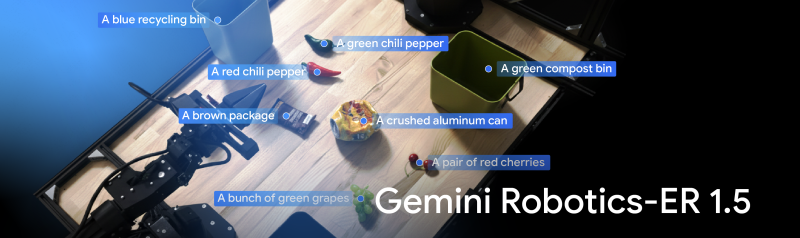
Building the Next Generation of Physical Agents with Gemini Robotics-ER 1.5
Gemini Robotics-ER 1.5, now available to developers, is a state-of-the-art embodied reasoning model for robots. It excels in visual, spatial understanding, task planning, and progress estimation, allowing robots to perform complex, multi-step tasks.
Introducing Tunix: A JAX-Native Library for LLM Post-Training
For developers and researchers in the JAX ecosystem, the path from a pre-trained model to a fully al…

Gemini 2.5 Flash Image now ready for production with new aspect ratios
Our state-of-the-art image generation and editing model which has captured the imagination of the wo…

Level Up Your Dev Game: The Jules API is Here!
Ready to help turbocharge your workflow? We’re excited to introduce the Jules API—a new way to autom…

Meet Jules Tools: A Command Line Companion for Google’s Async Coding Agent
You can now work with Jules directly in your command line. Jules is our asynchronous coding agent th…

Unlocking Multi-Spectral Data with Gemini
Multi-spectral imagery, which captures wavelengths beyond human vision, offers a „superhuman” way to understand the world, and Google’s Gemini models make this accessible without specialized training. By mapping invisible bands to RGB channels and providing context in the prompt, developers can leverage Gemini’s power for tasks like environmental monitoring and agriculture.

Gemini for Home: Expanding the Platform for a New Era of Smart Home AI
Google Home is enabling new Gemini-powered features for our partners’ devices and launching a new program to help them build the next generation of AI cameras.

Gemma explained: EmbeddingGemma Architecture and Recipe
The previous posts in the “Gemma explained” series provided a detailed overview of the Gemma model f…

Your AI is now a local expert: Grounding with Google Maps is now GA
We are excited to announce Grounding with Google Maps in Vertex AI is now Generally Available (GA). …

Apigee Operator for Kubernetes and GKE Inference Gateway integration for Auth and AI/LLM policies
No AI/Agents without APIs!Many users interact with generative AI daily without realizing the crucial…

Delight users by combining ADK Agents with Fancy Frontends using AG-UI
Delight users by combining ADK Agents with Fancy Frontends using AG-UIFor developers building genera…

Continuing to bring you our latest models, with an improved Gemini 2.5 Flash and Flash-Lite release
Google is releasing updated Gemini 2.5 Flash and Flash-Lite preview models with improved quality, speed, and efficiency. These releases introduce a „-latest” alias for easy access to the newest versions, allowing developers to test and provide feedback to shape future stable releases.

Google Colab Adds More Back to School Improvements!
Colab is back with a few new and exciting features meant to simplify and enhance your notebook-based…

Gemini CLI 🤝 FastMCP: Simplifying MCP server development
Gemini CLI now seamlessly integrates with FastMCP, Python’s leading library for building MCP servers. We’re thrilled to announce this integration between two open-source projects that empowers you to effortlessly connect your custom MCP tools and prompts, directly to Gemini CLI!

ADK for Java opening up to third-party language models via LangChain4j integration
The recent 0.2.0 release of Google’s Agent Development Kit (ADK) for Java adds an integration with t…

Google AI Edge Gallery: Now with audio and on Google Play
Google AI Edge has expanded the Gemma 3n preview to include audio support. Users can play with it on their own mobile phone using the Google AI Edge Gallery, which is now available in Open Beta on Play Store.

Announcing Genkit Go 1.0 and Enhanced AI-Assisted Development
We are launching 1.0 stable release of Genkit Go, empowering Go developers to build performant, production-ready AI-powered applications with Genkit. Recent enhancements include support for integrating and building MCP tools, expanding third-party model provider support, and production AI monitoring with Firebase. Additionally, we are announcing a new feature in the Genkit CLI to provide AI development tools, like the Gemini CLI and Cursor, with the latest knowledge of Genkit – supercharging Genkit development experience when using AI assistance.

Beyond backpropagation: JAX’s symbolic power unlocks new frontiers in scientific computing
JAX, a framework known for large-scale AI model development, is proving to be a powerful tool in scientific computing, particularly for solving complex Partial Differential Equations (PDEs), now being leveraged by researchers to achieve significant speed-ups and memory reductions in solving high-order PDEs and demonstrating its potential to unlock new frontiers in scientific discovery.

Gemini Batch API now supports Embeddings and OpenAI Compatibility
Batch API now supports Embeddings and OpenAI CompatibilityToday we are extending the Gemini Batch AP…

A2A Extensions: Empowering Custom Agent Functionality
A2A Extensions provide a flexible way to add custom functionalities to agent-to-agent communication, going beyond the core A2A protocol. They enable specialized features and are openly defined and implemented.

Veo 3 and Veo 3 Fast – new pricing, new configurations and better resolution
Today, we’re launching three big Veo updates: support for vertical format outputs (9:16 aspect ratio…

From Fine-Tuning to Production: A Scalable Embedding Pipeline with Dataflow
Learn how to use Google’s EmbeddingGemma, an efficient open model, with Google Cloud’s Dataflow and vector databases like AlloyDB to build scalable, real-time knowledge ingestion pipelines.

Introducing EmbeddingGemma: The Best-in-Class Open Model for On-Device Embeddings
Introducing EmbeddingGemma: a new embedding model designed for efficient on-device AI applications from Google. This open model is the highest-ranking text-only multilingual embedding model under 500M parameters on the MTEB benchmark, enabling powerful features like RAG and semantic search directly on mobile devices without an internet connection.

Stop “vibe testing” your LLMs. It’s time for real evals.
Stax, an experimental developer tool, addresses the insufficient nature of „vibe testing” LLMs by streamlining the LLM evaluation lifecycle, allowing users to rigorously test their AI stack and make data-driven decisions through human labeling and scalable LLM-as-a-judge auto-raters.

How to prompt Gemini 2.5 Flash Image Generation for the best results
Detailed prompting techniques and best practices for various applications, including photorealistic scenes, stylized illustrations, product mockups, and more using Google’s newly released Gemini 2.5 Flash Image; a natively multimodal model capable of generating, editing, and composing images using text, supporting capabilities like text-to-image, image editing, style transfer, and multi-image composition.

Beyond the terminal: Gemini CLI comes to Zed
Google and Zed have partnered to integrate Gemini CLI directly into the Zed code editor, bringing AI capabilities directly into the editor for developers and allowing for faster and more focused coding, enabling tasks like in-place code generation, instant answers, and natural chat within the terminal with a seamless review workflow for AI-generated changes.

Introducing Gemini 2.5 Flash Image, our state-of-the-art image model
Gemini 2.5 Flash Image is a new state-of-the-art image generation and editing model that allows for blending multiple images, maintaining character consistency, and targeted transformations using natural language, leveraging Gemini’s world knowledge, now available through the Gemini API, Google AI Studio, and Vertex AI.

What’s new in Gemini Code Assist
Gemini Code Assist’s Agent Mode, now available in VS Code (Preview) and IntelliJ (Stable), streamlines complex coding tasks by proposing detailed plans for user review and approval. This intelligent, collaborative approach, enhanced with features like inline diffs and persistent chat history, aims to boost developer productivity and efficiency.

Train a GPT2 model with JAX on TPU for free
Build and train a GPT2 model from scratch using JAX on Google TPUs, with a complete Python notebook for free-tier Colab or Kaggle. Learn how to define a hardware mesh, partition model parameters and input data for data parallelism, and optimize the model training process.

URL context tool for Gemini API now generally available
The Gemini API’s URL Context tool is now generally available, allowing developers to ground prompts using web content instead of manual uploads. This release expands support to PDFs and images.

Announcing Imagen 4 Fast and the generally availability of the Imagen 4 family in the Gemini API
Google announces the general availability of Imagen 4, its advanced text-to-image model, in the Gemini API and Google AI Studio, featuring significant improvements in text rendering. The new Imagen 4 Fast model, designed for speed and rapid image generation, is now available alongside Imagen 4 and Imagen 4 Ultra, with Imagen 4 and Imagen 4 Ultra also supporting up to 2K resolution image generation.

Introducing Gemma 3 270M: The compact model for hyper-efficient AI
Google’s new Gemma 3 270M is a compact, 270-million parameter model offering energy efficiency, production-ready quantization, and strong instruction-following, making it a powerful solution for task-specific fine-tuning in on-device and research settings.

Gemini CLI + VS Code: Native diffing and context-aware workflows
The latest Gemini CLI update provides a deep IDE integration within VS Code for intelligent, context-aware suggestions, and native in-editor diffing, allowing developers to review and modify proposed changes directly within the diff view for a more efficient workflow.

Meet Jules’ sharpest critic and most valuable ally
Jules’ critic functionality addresses potential issues like subtle bugs and missed edge cases in AI-generated code by acting as a peer reviewer within the generation process. This „critic-augmented generation” means proposed code changes undergo adversarial review, allowing Jules to improve its output and ultimately deliver higher-quality, pre-reviewed code.

Introducing LangExtract: A Gemini powered information extraction library
LangExtract is a new open-source Python library powered by Gemini models for extracting structured information from unstructured text, offering precise source grounding, reliable structured outputs using controlled generation, optimized long-context extraction, interactive visualization, and flexible LLM backend support.

The Google Developer Program is evolving
The Google Developer Program is rolling out major updates to make its tools and community more accessible and powerful. These enhancements include a new flexible monthly subscription tier, a centralized GDP Forum for collaboration, and increased Gemini CLI access for all members.

Veo 3 Fast and new image-to-video capabilities
Google introduces Veo 3 Fast, an optimized model for speed and price, along with new image-to-video capabilities for both Veo 3 and Veo 3 Fast, enabling developers to efficiently create high-quality video content from text or still images, with varying pricing based on the model and audio inclusion, now available in the Gemini API.

Gemini Embedding: Powering RAG and context engineering
The Gemini Embedding model enhances AI applications, particularly through context engineering, which is being successfully adopted by various organizations across industries to power context-aware systems, leading to significant improvements in performance, accuracy, and efficiency.

A roboticist’s journey with JAX: Finding efficiency in optimal control and simulation
Max’s journey introduces LQRax, a JAX-native LQR solver, which exemplifies the growing JAX robotics ecosystem that includes tools like Brax, MJX, and JaxSim, highlighting the benefits of JAX for computational efficiency in optimal control and simulation, and for seamlessly integrating model-based and learning-based approaches.

People of AI podcast Season 5 is here: Meet the builders shaping the future
Co-hosted by Ashley Oldacre and Christina Warren, People of AI podcast’s Season 5 will focus on the builders in the space of AI, highlighting the unique journeys, challenges, and triumphs of these innovators.

The agentic experience: Is MCP the right tool for your AI future?
Apigee helps enterprises integrate large language models (LLMs) into existing API ecosystems securely and scalably, addressing challenges like authentication and authorization not fully covered by the evolving Model Context Protocol (MCP), and offering an open-source MCP server example that demonstrates how to implement enterprise-ready API security for AI agents.

Introducing Opal: describe, create, and share your AI mini-apps
Opal is a new experimental tool from Google Labs that helps you compose prompts into dynamic, multi-step mini-apps using natural language, removing the need for code, allowing users to build and deploy shareable AI apps with powerful features and seamless integration with existing Google tools.

Unleashing new AI capabilities for popular frameworks in Firebase Studio
New AI capabilities for popular frameworks in Firebase Studio include AI-optimized templates, streamlined integration with Firebase backend services, and the ability to fork workspaces for experimentation and collaboration, making AI-assisted app development more intuitive and faster for developers worldwide.

Gemini 2.5 Flash-Lite is now stable and generally available
Gemini 2.5 Flash-Lite, previously in preview, is now stable and generally available. This cost-efficient model is ~1.5x faster than 2.0 Flash-Lite and 2.0 Flash, offers high quality, and includes 2.5 family features like a 1 million-token context window and multimodality.

Conversational image segmentation with Gemini 2.5
Gemini’s advanced capability for conversational image segmentation allows intuitive interaction with visual data by understanding complex phrases, conditional logic, and abstract concepts, streamlining developer experience and opening doors for new applications in media editing, safety monitoring, and damage assessment.

Unlock Gemini’s reasoning: A step-by-step guide to logprobs on Vertex AI
The `logprobs` feature has been officially introduced in the Gemini API on Vertex AI, provides insight into the model’s decision-making by showing probability scores for chosen and alternative tokens. This step-by-step guide will walk you through how to enable and interpret this feature and apply it to powerful use cases such as confident classification, dynamic autocomplete, and quantitative RAG evaluation.

Simplify your Agent „vibe building” flow with ADK and Gemini CLI
The updated Agent Development Kit (ADK) simplifies and accelerates the process of building AI agents by providing the CLI with a deep, cost-effective understanding of the ADK framework, allowing developers to quickly ideate, generate, test, and improve functional agents through conversational prompts, eliminating friction and keeping them in a productive „flow” state.

Build with Veo 3, now available in the Gemini API
Veo 3, Google’s latest AI video generation model, is now available in paid preview via the Gemini API and Google AI Studio. Unveiled at Google I/O 2025, Veo 3 can generate both video and synchronized audio, including dialogue, background sounds, and even animal noises. This model delivers realistic visuals, natural lighting, and physics, with accurate lip syncing and sound that matches on-screen action.
Stanford’s Marin foundation model: The first fully open model developed using JAX
The Marin project aims to expand the definition of ‘open’ in AI to include the entire scientific process, not just the model itself, by making the complete development journey accessible and reproducible. This effort, powered by the JAX framework and its Levanter tool, allows for deep scrutiny, trust in, and building upon foundation models, fostering a more transparent future for AI research.
Incidentul de Securitate Cibernetică la Co-op: Detalii și Impact
In her first interview since the attack, Co-op’s chief executive said she was „incredibly sorry” to customers.

Enterprise truth in action: Apigee API hub fueling powerful Developer Portals
The Apigee API hub and Developer Portals are distinct but interconnected parts of the Apigee platform that help organizations discover and manage APIs for different personas, unlocking API potential and accelerating innovation.
WeTransfer și Utilizarea Fișierelor pentru AI: Clarificări Oficiale
Some social media users had threatened to delete their accounts after WeTransfer’s terms were updated.

Gemini Embedding now generally available in the Gemini API
The Gemini Embedding text model is now generally available in the Gemini API and Vertex AI. This versatile model has consistently ranked #1 on the MTEB Multilingual leaderboard since its experimental launch in March, supports over 100 languages, has a 2048 maximum input token length, and is priced at $0.15 per 1M input tokens.
Informații Importante despre Securitate pentru Utilizatorii Paddy Power și Betfair
Hackers have accessed personal information of potentially 800,000 customers of Flutter Entertainment.
Protecția Online a Copiilor: Noi Reglementări și Rolul Ofcom
Cabinet minister Heidi Alexander says age checks will not mark the „end of the conversation”.

Announcing GenAI Processors: Build powerful and flexible Gemini applications
GenAI Processors is a new open-source Python library from Google DeepMind designed to simplify the development of AI applications, especially those handling multimodal input and requiring real-time responsiveness, by providing a consistent „Processor” interface for all steps from input handling to model calls and output processing, for seamless chaining and concurrent execution.

Advancing agentic AI development with Firebase Studio
Updates in Firebase Studio include new Agent modes, foundational support for the Model Context Protocol (MCP), and Gemini CLI integration, all designed to redefine AI-assisted development allow developers to create full-stack applications from a single prompt and integrate powerful AI capabilities directly into their workflow.
Val de Atacuri Cibernetice: Detalii și Implicații
Three men and one woman – aged between 17 and 20 – have been arrested in London and the Midlands.
Elon Musk și Provocările Inteligenței Artificiale: Abordarea Controversei
Anti-hate campaigners say the posts were „irresponsible, dangerous and antisemitic.”

T5Gemma: A new collection of encoder-decoder Gemma models
T5Gemma is a new family of encoder-decoder LLMs developed by converting and adapting pretrained decoder-only models based on the Gemma 2 framework, offering superior performance and efficiency compared to its decoder-only counterparts, particularly for tasks requiring deep input understanding, like summarization and translation.
Linda Yaccarino Părăsește Compania lui Elon Musk
Her exit comes at a difficult time for Musk who, in a brief reply, thanked her for her „contributions.”
Nvidia atinge o valoare de piață de 4 trilioane de dolari
Shares in the chip-maker have surged in value as investment in AI continues to gather pace.
Tensiuni Om-Mașină la Wimbledon: Intervenția Tehnologiei
Technology editor Zoe Kleinman explores the tensions between humans and machines that were encapsulated at Wimbledon.

Batch Mode in the Gemini API: Process more for less
The new batch mode in the Gemini API is designed for high-throughput, non-latency-critical AI workloads, simplifying large jobs by handling scheduling and processing, and making tasks like data analysis, bulk content creation, and model evaluation more cost-effective and scalable, so developers can process large volumes of data efficiently.
Xbox și Reacția Comunității la Sugestia Utilizării AI în Contextul Disponibilizărilor
An Xbox producer faces a backlash after suggesting AI tools can help to deal wih the emotions that follow job loss.
Optimizarea AI pentru Securitatea Națională
Peter Kyle says the Alan Turing Institute should prioritise boosting the UK’s AI capabilities.
Misterul The Velvet Sundown și Dezbaterile despre Inteligența Artificială în Muzică
The Velvet Sundown has racked up hundreds of thousands of streams on Spotify – without anyone even being sure if it’s real.
Microsoft Anunță Reduceri de Personal: Impactul asupra Diviziei Xbox
The US tech giant will axe 4% of its global workforce and plough money into artificial intelligence.
Optimizarea SEO: Impactul Erorilor Tehnice asupra Utilizatorilor
After Meta said some Facebook Groups were wrongly suspended, users tell the BBC the impact it is having – and say it’s a wider problem.

Multilingual innovation in LLMs: How open models help unlock global communication
Developers adapt LLMs like Gemma for diverse languages and cultural contexts, demonstrating AI’s potential to bridge global communication gaps by addressing challenges like translating ancient texts, localizing mathematical understanding, and enhancing cultural sensitivity in lyric translation.
Scăderea livrărilor de vehicule Tesla: Ce urmează pentru gigantul auto?
Elon Musk’s controversial role in the Trump administration has been blamed for the collapse in sales.

Google Cloud donates A2A to Linux Foundation
Google, along with Amazon and Cisco, announces the formation of the Agent2Agent Foundation under the Linux Foundation, establishing A2A as an industry standard for AI agent interoperability, fostering a diverse ecosystem, ensuring neutral governance, and accelerating secure innovation in AI applications.
Elon Musk angajează un dezvoltator de produs pentru X: Progresul tehnologic
Nikita Bier has previously developed platforms that have proved popular with teen users.

Imagen 4 is now available in the Gemini API and Google AI Studio
Imagen 4, Google’s advanced text-to-image model, is now available in paid preview via the Gemini API and Google AI Studio, offering significant quality improvements, especially for text generation within images. The Imagen 4 family includes Imagen 4 for general tasks and Imagen 4 Ultra for high-precision prompt adherence, with all generated images featuring a non-visible SynthID watermark.
Optimizare SEO și Siguranța Online: Protejarea Copiilor pe Platformele Digitale
UK regulator Ofcom is consulting on more safety measures for online platforms, such as preventing screen-records of children’s livestreams.

Using KerasHub for easy end-to-end machine learning workflows with Hugging Face
KerasHub enables users to mix and match model architectures and weights across different machine learning frameworks, allowing checkpoints from sources like Hugging Face Hub (including those created with PyTorch) to be loaded into Keras models for use with JAX, PyTorch, or TensorFlow. This flexibility means you can leverage a vast array of community fine-tuned models while maintaining full control over your chosen backend framework.

Unlock deeper insights with the new Python client library for Data Commons
Google has released a new Python client library for Data Commons – an open-source knowledge graph that unifies public statistical data, and enhances how data developers can leverage Data Commons by offering improved features, support for custom instances, and easier access to a vast array of statistical variables – developed with contributions from The ONE Campaign.

Introducing Gemma 3n: The developer guide
The Gemma 3n model has been fully released, building on the success of previous Gemma models and bringing advanced on-device multimodal capabilities to edge devices with unprecedented performance. Explore Gemma 3n’s innovations, including its mobile-first architecture, MatFormer technology, Per-Layer Embeddings, KV Cache Sharing, and new audio and MobileNet-V5 vision encoders, and how developers can start building with it today.
Tehnologia de Reciclare a Deșeurilor Alimentare cu Ajutorul Larvelor în Vilnius
In Lithuania and Australia, hungry fly larvae are used to process food waste into useful protein.
Lansarea Smartphone-ului Trump T1: Un Design de Mândrie Americană
Trump Mobile maintains the gold smartphone will be made in the US, despite the changed wording on its website.

Simulating a neural operating system with Gemini 2.5 Flash-Lite
A research prototype simulating a neural operating system generates UI in real-time adapting to user interactions with Gemini 2.5 Flash-Lite, using interaction tracing for contextual awareness, streaming the UI for responsiveness, and achieving statefulness with an in-memory UI graph.
Optimizarea Siguranței pentru Copii Online: Verificări Riguroase de Vârstă
It is one of a number of porn sites which regulator Ofcom says will bring in tougher age verification for users.
Facebook Rezolvă Problema Grupurilor Suspendate Incorect
Group administrators have reported receiving automated messages which incorrectly say they have violated the rules.

Supercharge your notebooks: The new AI-first Google Colab is now available to everyone
The new AI-first Google Colab enhances productivity with improvements powered by features like iterative querying for conversational coding, a next-generation Data Science Agent for autonomous workflows, and effortless code transformation. Early adopters report a dramatic productivity boost, accelerating ML projects, debugging code faster, and effortlessly creating high-quality visualizations.
Probleme cu apelurile telefonice la operatorul Three
The phone operator said it was „aware of an issue affecting voice services” and apologised for disruption.

Gemini 2.5 for robotics and embodied intelligence
Gemini 2.5 Pro and Flash are transforming robotics by enhancing coding, reasoning, and multimodal capabilities, including spatial understanding. These models are used for semantic scene understanding, code generation for robot control, and building interactive applications with the Live API, with a strong emphasis on safety improvements and community applications.
Optimizarea SEO: Ghiduri Stricte pentru Succes
Videos posted online appear to show the newly launched self-driving cars speeding and driving in the wrong lane.
Robotaxi Tesla: Inovația Transportului Urban
Tesla hopes to rival firms already offering driverless ride-hailing in the US and around the world, such as Waymo, Zoox and Baidu.
BBC analizează măsuri legale împotriva Perplexity AI pentru utilizarea neautorizată a conținutului
It is first time that the BBC has taken such action regarding alleged scraping of its content for AI.
Președintele Trump Extinde Termenul pentru Vânzarea TikTok în SUA
It’s the third time the date has been moved back by Trump since he took office in January.

Gemini Code Assist in Apigee API Management now generally available
Gemini Code Assist in Apigee API Management enhances API development with AI-assisted features like natural language API creation, AI-generated summaries, and iterative design, allowing seamless integration with your organization’s existing API ecosystem and ensuring consistency, security, and reduced duplication, while offering enterprise-grade security and a streamlined development workflow.
Texas Instruments investește peste 60 de miliarde USD în SUA
The announcement comes as Trump pressures big technology firms to increase manufacturing in America.
Armele 3D-printate: O amenințare crescândă
The technology to build your own lethal weapon is promoted on social media

Gemini 2.5: Updates to our family of thinking models
Google is releasing updates to its Gemini 2.5 model family, including the generally available and stable Gemini 2.5 Pro and Flash, and the new Gemini 2.5 Flash-Lite „thinking models” in preview, offering enhanced performance and accuracy, with Flash-Lite providing a lower-cost option.
OpenAI versus Meta: Lupta pentru Talente în Inteligența Artificială
Sam Altman said so far none of his „best people” had jumped ship to his big tech rival.
Smartphone-ul Trump: Posibil Fabricat în America?
It is the latest plan by US President Donald Trump’s family that looks to cash in on his name.
Impactul mineritului de nichel în Arhipelagul Raja Ampat
Photographs appear to show how nickel mining damaged one the world’s most diverse marine environments
Confidențialitatea Căutărilor Online și Meta AI
Meta AI users may be inadvertently making their searches public without realising it.
Meta inițiază acțiuni legale împotriva aplicațiilor de nudificare
The apps use artificial intelligence to create fake nude images of people without their consent.
Reglementarea Drepturilor de Autor pentru AI în Regatul Unit
Leading artists said the bill needed to be changed to protect them from having their work copied by AI.
Disney și Universal în Proces cu Midjourney pentru Plagiat
The Hollywood studios allege Midjourney’s image generator is a „bottomless pit of plagiarism”.

Google Pay inside sandboxed iframe for PCI DSS v4 compliance
Use a sandboxed iframe to implement Google Pay on checkout pages, which helps comply with PCI DSS v4 requirements by isolating scripts. Shopify successfully implemented this method and passed the PCI DSS v4 audit.
WhatsApp sprijină Apple în lupta pentru intimitatea datelor utilizatorilor
The messaging app says the UK government’s demands over data access could set a „dangerous precedent.”
Diseminarea Dezinformării pe Social Media și Impactul său în Los Angeles
Disinformation spreading on social media platforms has stoked an already tense situation.
Optimizare SEO: Ofcom investighează 4chan pentru nerespectarea normelor de siguranță online
Nine companies are under investigation by Ofcom, using powers of the Online Safety Act.
Microsoft dezvăluie consola portabilă ROG Xbox Ally
The ROG Xbox Ally will use Game Pass on-the-go – meaning subscribers start off with hundreds of games.
Optimizare SEO Strictă: Ghid Pentru Siguranța Online a Copiilor
The BBC understands proposals include a two-hour cap on apps and a 22:00 curfew.
Elon Musk și Impactul Declarațiilor Politice asupra Tesla
Experts say his tech empire needs more of Musk’s attention – but also the continued custom of the government.
Soluționare Probleme Aplicație Mobilă NatWest
More than 3,000 people have reported problems during what is the latest in a long line of banking IT failures.
Lansarea Nintendo Switch 2: Așteptări și Realități
One retailer says it’s the „biggest gaming pre-order ever” – but there questions over whether high prices will dent sales.

What’s new with Agents: ADK, Agent Engine, and A2A Enhancements
Updates to Google’s agent technologies include the Agent Development Kit (ADK) with new Python and Java versions, an improved Agent Engine UI for management, and enhancements to the Agent2Agent (A2A) protocol for better agent communication and security.
TikTok blochează hashtag-ul #skinnytok pentru protecția utilizatorilor
The app acknowledged the viral hashtag had been become linked to „unhealthy weight loss content.”

On-device small language models with multimodality, RAG, and Function Calling
Google AI Edge advancements, include new Gemma 3 models, broader model support, and features like on-device RAG and Function Calling to enhance on-device generative AI capabilities.
Pornhub Operează Schimbări în Franța: Noua Lege de Verificare a Vârstei
It’s the latest setback for the world’s most popular porn site, which is also under investigation by the EU.

Building agents with Google Gemini and open source frameworks
Google Gemini models offer several advantages when building AI agents, such as advanced reasoning, function calling, multimodality, and large context window capabilities. Open-source frameworks like LangGraph, CrewAI, LlamaIndex, and Composio can be used with Gemini for agent development.
Protecția Drepturilor de Autor în Era Tehnologiei: Dezbateri în Camera Lorzilor
The bitter row over how to protect artists in the artificial intelligence age returns to the Lords.

What you should know from the Google I/O 2025 Developer keynote
Top announcements from Google I/O 2025 focus on building across Google platforms and innovating with AI models from Google DeepMind, with key focus on new tools, APIs, and features designed to enhance developer productivity and create AI-powered experiences using Gemini, Android, Firebase, and web.

Announcing Gemma 3n preview: powerful, efficient, mobile-first AI
Gemma 3n is a cutting-edge open model designed for fast, multimodal AI on devices, featuring optimized performance, unique flexibility with a 2-in-1 model, and expanded multimodal understanding with audio, empowering developers to build live, interactive applications and sophisticated audio-centric experiences.

Exploring the Magic Mirror: an interactive experience powered by the Gemini models
The Magic Mirror project utilizes the Gemini API, including the Live API, Function Calling, and Grounding with Google Search, to create an interactive and dynamic experience, demonstrating the power of the Gemini models to generate visuals, tell stories, and provide real-time information through a familiar object.
Problema Pirateriei și Impactul asupra Fire Stick
New research singles out the Amazon Fire Stick as the most popular means of accessing illegal streams.
Elon Musk și Reducerea Cheltuielilor Federale: Un Impact Global
The tech billionaire and Doge have spearheaded dramatic changes in the US government and Washington.

Data-driven marketing starts with developers
Three developer-friendly MarTech solutions – sGTM Pantheon for data control, GA4 Dataform for data transformation, and FeedX for A/B testing shopping feeds – empower developers to leverage marketing data for insights, strategies, and better results.
Lansarea Nintendo Switch 2 – Game Își Cere Scuze pentru Anulările Precomenzilor
Affected customers – who have waited years for the console launch – have reacted with fury.
Victoria’s Secret și incidentul de securitate: Restabilirea operațiunilor
Some in-store services are also suspended – the lingerie firm says it is „working round the clock” to restore them.

Adding support for Google Pay within Android WebView
Google Pay support within Android WebView is now available, starting with WebView version 137 and Play Services 25.18.30, allowing users to utilize the native Google Pay payment sheet within embedded web checkout processes.
Integrarea AI în Telegram: Colaborarea cu xAI a lui Elon Musk
The $300m deal, which will last one year, will see xAI’s assistant Grok integrated into Telegram.

LiteRT: Maximum performance, simplified
LiteRT has been improved to boost AI model performance and efficiency on mobile devices by effectively utilizing GPUs and NPUs, now requiring significantly less code, enabling simplified hardware accelerator selection, and more for optimal on-device performance.
Adidas raportează un atac cibernetic și furtul datelor personale ale clienților
The sportswear giant says criminals accessed its systems through a „third-party customer service provider.”
From idea to app: Introducing Stitch, a new way to design UIs
Stitch, a new Google Labs experiment, uses AI to generate UI designs and frontend code from text prompts and images, aiming to streamline the design and development workflow, offering features like UI generation from natural language or images, rapid iteration, and seamless paste to Figma and front-end code.
Realitate sau Ficțiune Științifică: Conștiința AI este deja aici?
With a leap in the evolution of large language models, some leading thinkers are questioning whether AI might become sentient

An upgraded dev experience in Google AI Studio
Google AI Studio has been upgraded to enhance the developer experience, featuring native code generation with Gemini 2.5 Pro, agentic tools, and enhanced multimodal generation capabilities, plus new features like the Build tab, Live API, and improved tools for building sophisticated AI applications.

Explore the latest updates on Google Wallet
Google Wallet has expanded globally and introduced new features like digital IDs via a new Digital Credentials API, granular notifications for pass updates, and nearby pass notifications, along with other features like Value Added Opportunities and a Pass Upgrade experience.

Gemini API I/O updates
Announcing new features and models for the Gemini API, with the introduction of Gemini 2.5 Flash Preview with improved reasoning and efficiency, Gemini 2.5 Pro and Flash text-to-speech supporting multiple languages and speakers, and Gemini 2.5 Flash native audio dialog for conversational AI.
Optimizarea SEO și ancheta internă în urma atacului cibernetic la Marks & Spencer
M&S said earlier this week that the hackers got into systems via a third party – but did not say who that was.
Optimizarea SEO: Importanța și Riscurile Inteligenței Artificiale
In a fictional scenario, the model was willing to expose that the engineer seeking to replace it was having an affair.
Criptomoneda $TRUMP: De la critic la investitor
Trump hosted the biggest investors in his own cryptocurrency, but insisted he put the country ahead of his businesses interests.

Bringing Gemini intelligence to Google Home APIs
Gemini intelligence is being integrated into Google Home APIs, offering developers access to over 750 million devices and enabling advanced features like AI-powered camera analysis and automated routines.
Reinventarea computerului: Parteneriatul dintre OpenAI și Sir Jony Ive
The man who designed the iPad, iMac and iPhone will try to come up with a new generation of products for the AI era.

New Google Pay features to enhance your payment flows
At Google I/O 2025, new Google Pay API updates were unveiled to enhance checkout experiences with features like Android WebViews integration, a more versatile API, and improved developer tools.
Campania cibernetică nocivă din UK vizând asistența pentru Ucraina
A joint investigation by the UK and allies found Russian hackers in the systems of logistics organisations.

Fully Reimagined: AI-First Google Colab
Google Colab is launching a reimagined AI-first version at Google I/O, featuring an agentic collaborator powered by Gemini 2.5 Flash with iterative querying capabilities, an upgraded Data Science Agent, effortless code transformation, and flexible interaction methods, aiming to significantly improve coding workflows.
Optimizarea SEO și Provocările Securității Cibernetice în Bănci
Ian Stuart, from HSBC, said banks were spending „enormous” sums shoring up their IT systems.
Supercomputerul Met Office Promite Prognoze Meteorologice Mai Precise
Detailed weather forecasts and better predictions about the rain will soon be enjoyed in the UK.
Despre Puterea în Lumea Cyber: Cine Trage Sforile?
BBC’s Joe Tidy spoke directly to those who claim they are responsible for hacking M&S and Co-op.
Tesco își Cere Scuze pentru Problemele IT ce Afectează Comenzile Online
The company apologised to customers after its app and website went down on Friday afternoon.
Optimizarea Energetică pentru Centrele de Date AI în UK
The world’s largest cloud computing company plans to spend £8bn on new data centres in the UK over the next four years.
Coinbase și Impactul Atacului Cibernetic
The firm says hackers have obtained customer information by paying off employees.

Google Cloud announces general availability of APIM Operator for Apigee
The Apigee APIM Operator is now generally available, bringing API Management and Gateway capabilities to GKE environments using Kubernetes-like YAML configuration, providing developer-native tooling, reducing friction, and offering policy management comparable to Apigee Hybrid.
Revenirea nivelurilor normale de stoc la Co-op după atacul cibernetic
The grocery chain says it is working with its suppliers to restock shelves after a cyber-attack.
Integrarea Inteligenței Artificiale în Radiologie: Evoluția și Impactul
Experts predicted that artificial intelligence would steal radiology jobs. But at the Mayo Clinic, the technology has been more friend than foe.

Build and train a recommender system in 10 minutes using Keras and JAX
Keras Recommenders (KerasRS) is a new library announced to help developers build recommendation systems using APIs with building blocks for ranking and retrieval, and it can be installed via pip with support for JAX, TensorFlow, or PyTorch backends.
Securitate Online: Cum să Reacționezi la Furtul de Date Personale
The retail giant is still not taking online orders following a cyber attack three weeks ago.
Compania Boring Evaluată pentru Proiectul de Cale Ferată Multimiliardar
The Federal Railroad Administration has brought in the tunneling company to see if it could help with a multibillion-dollar rail project.

Announcing the Agent2Agent Protocol (A2A)
Agent2Agent (A2A) protocol is an open standard designed to enable AI agents from different vendors and frameworks to collaborate and exchange information across enterprise platforms aiming to foster a future of seamless AI agent interoperability and enhanced automation.
ScotRail adoptă tehnologia satelitului lui Elon Musk pentru Wi-Fi în trenuri
The technology being trailed in the north of Scotland is powered by billionaire Elon Musk’s company Starlink.
Dominanța SUA în Tehnologia Chipurilor A.I. pe Scena Orientului Mijlociu
As the president heads to the Middle East, America’s dominance over A.I. chips has become a powerful source of leverage for the president.

Agent Development Kit: Making it easy to build multi-agent applications
The Agent Development Kit (ADK), an open-source framework from Google designed to simplify the development of multi-agent systems, providing tools for building, interacting, evaluating, and deploying agents.

Advancing the frontier of video understanding with Gemini 2.5
Gemini 2.5 marks a major leap in video understanding, achieving state-of-the-art performance on key video understanding benchmarks and being able to seamlessly use audio-visual information with code and other data formats.
Modelul T și Efectul său asupra Mass-Media: Reflectarea Istoriei
The Tesla billionaire is using his social media site X to rant and accuse. The politics of rage rarely worked out well for earlier moguls.
Cerere actualizare legi drepturi de autor pentru protecția împotriva IA
They are among 400 artists appealing to Sir Keir Starmer, saying creative industries are threatened.
Schimbări în Aplicațiile iPhone: Efectele Hotărârii Judecătorești
A federal judge’s recent ruling has made it possible for apps to sell software and subscriptions outside the App Store without having to pay a commission.

Google AI for game developers
Revisit announcements from this year’s Games Developer Conference (GDC). Explore how Gemma and Gemini models can aid in building AI experiences in games with the launch of Gemma 3, the Unity plugin, its application in a sample game, and scaling games with generative AI in Google Cloud.
Ofcom inițiază investigații asupra site-urilor pentru adulți
The UK demanded in January that porn sites show how they were beefing up age verification to stop children accessing them.
Apple și Provocările Comisioanelor din App Store
Court documents show the company commissioned a sham report and lied on the stand to justify its actions, which will cast a shadow over future lawsuits.

Gemini 2.5 Models now support implicit caching
The rollout of implicit caching in the Gemini API expands on the existing explicit caching API, providing an „always on” caching system which offers automatic cost savings to developers using Gemini 2.5 models and continued availability of the explicit caching API for guaranteed savings.
Incidente de Plată în Ziua de Salariu: Problemele Infrastructurii Bancare
In a letters to MPs, four major banks have set out the extent of the disruption caused in February’s outage.
Wikipedia și reglementările legale: acțiunea în justiție explicată
It argues the regulations could threaten the privacy and safety of Wikipedia’s volunteer contributors.
Fidji Simo se alătură OpenAI ca director executiv al aplicațiilor
Sam Altman, OpenAI’s chief executive, said he hired Instacart’s Fidji Simo to join in a new role as chief executive of applications.

Create and edit images with Gemini 2.0 in preview
Gemini 2.0 Flash’s image generation capabilities, now available in preview in Google AI Studio and Vertex AI, feature higher rate limits, enhanced visual quality, more precise text rendering, and more, allowing developers to create applications for product recontextualization, collaborative image editing, and dynamic SKU generation.
Regulatorul Media Ofcom și Nevoia de Puteri Suplimentare pentru Siguranța Online
It says the 2024 summer riots showed the regulator does not have the tools to stop the spread of viral misinformation.
Elon Musk și Discreția Proprietăților din West Lake Hills
The tech billionaire’s staff was concerned that correspondence about his home in West Lake Hills would become public after neighbors complained.

Gemini 2.5 Pro Preview: even better coding performance
An updated I/O edition preview of Gemini 2.5 Pro is being released for developers, featuring best-in-class front-end and UI development performance, ranking #1 on the WebDev Arena leaderboard, and showcasing applications like video to code and easier feature development through starter apps.

Gemini 2.5 Flash and Pro, Live API, and Veo 2 in the Gemini API
Updates to the Gemini API, including the production readiness of Veo 2 for video generation, the preview of the Live API for real-time interactions, and the upcoming Gemini 2.5 Flash model, alongside the existing Gemini 2.5 Pro aim to enhance developer capabilities in building AI applications with improved thinking models, dynamic interactions, and high-quality video generation.
Impactul Atacului Cibernetic asupra Co-op: Magazine cu Rafturi Goale
The retailer says „sustained malicious attempts by hackers” is affecting its IT systems.
OpenAI devine societate cu beneficiu public
The company will become a public benefit corporation and the nonprofit that has controlled it will be its largest shareholder.
OpenAI Adoptă Un Nou Plan de Guvernanță
The move follows a bitter power struggle over the business.

Unlock your potential: Discover the enhanced Google Developer Program
The Google Developer Program is evolving with AI-powered tools like Gemini Code Assist and expanded resources, including new Premium and Enterprise offerings, access to product previews, and increased workspace capacity, making it easier for developers to build and innovate.
Optimizarea SEO Strictă: Ghiduri pentru Securitatea Cibernetică
The NCSC urges firms to check IT help desk „password reset processes” as hackers target retailers.
Optimizarea SEO: Reguli Esențiale și Aplicații Practice
A new wave of “reasoning” systems from companies like OpenAI is producing incorrect information more often. Even the companies don’t know why.
Elon Musk, Vecinul Din West Lake Hills
Residents of an upscale enclave outside Austin, Texas, learned the hard way what it’s like when a multibillionaire moves into the mansion next door. Some of them have started a ruckus over it.

Bring your ideas to life: Veo 2 video generation available for developers
Generate high-quality videos from text and image prompts with Veo 2, a video generation model, now generally available in the Gemini API and Google AI Studio to enhance your content creation and marketing efforts.
Poveștile de Dragoste la Distanță și Skype
As Microsoft shuts it down, we’ve spoken to people whose lives were impacted by the tools.
Patrimoniul cowboy și media din Oakdale: O schimbare a paradigmei
Residents of Oakdale, Calif., have abandoned traditional media outlets for a mishmash of online sources. These days, they’re often not sure what information to trust.

Apigee announces general availability of APIM Extension Processor
The Apigee Extension Processor enhances Apigee’s capabilities by enabling it to manage gRPC streaming and integrate with Google Cloud services through Cloud Load Balancing, allowing for applying Apigee policies to a wider range of backend services, and improving secure access to Google Cloud infrastructure.
Securitatea Cibernetică: Alertă Majoră pentru Co-op
The firm previously said there was „no evidence that customer data was compromised”.
Google Lansează Chatbotul Gemini pentru Copii
The tech giant said it would make its Gemini chatbot available to children next week, and warned families in an email about the changes.

How It’s Made: Little Language Lessons uses Gemini’s multilingual capabilities to personalize language learning
Little Language Lessons, a project leveraging Gemini’s API and Cloud services to generate content, translate, and provide text-to-speech functionalities, includes vocabulary lessons, slang practice, and object recognition for language learning.
Eroare de Prețuri pe Deliveroo Afectează Produsele Co-op
The pricing error allowed some shoppers to get pasta sauce, coffee and cookies for free.
TikTok se confruntă cu o amendă uriașă pentru încălcarea GDPR
Irish investigators said TikTok did not protect the data of users in the European Union, improperly transferring some of it to China. TikTok said it would appeal.

Gemma explained: What’s new in Gemma 3
Gemma 3’s new features include vision-language capabilities and architectural changes for improved memory efficiency and longer context handling compared to previous Gemma models.
Protecția Datelor în Fața Atacurilor Cibernetice
The retailer is reeling from a ransomware attack – here’s what other people did when in the same situation.
Decizie Majoră în Cazul Antitrust Apple vs Epic Games
The ruling was a stinging defeat for Apple in a long-running antitrust case brought by Epic Games, the maker of Fortnite, on behalf of app developers.

Announcing the general availability of Llama 4 MaaS on Vertex AI
Llama 4, Meta’s advanced large language model, is now generally available as a fully managed API on Vertex AI, simplifying deployment and management. The Llama 3.3 70B managed API is also generally available, offering users greater flexibility.
Co-op Confruntă Tentative de Hacking: Măsuri și Impact
The retailer says it’s disabled parts of its IT systems in response to the incident.
Protecția Datelor Personale Sensibile: Ghiduri de Optimizare SEO
Here are some best practices for safeguarding sensitive personal data.

Usability and safety updates to Google Auth Platform
Updates to the Google Auth Platform include changes to OAuth configuration, client secrets display, and automatic deletion of unused clients, making the platform more secure and easier to use.
Metode eficiente de generare a lead-urilor în tehnologie
In the competitive landscape of the tech industry, generating high-quality leads is crucial for business growth and sustainability. This blog highlights proven lead generation methods and tools specifically designed for tech enterprises. Find out how TechForge can help solve your marketing challenges here. Effective Lead Generation Methods Content Marketing Content marketing remains a cornerstone of […]
The post Lead Generation for B2B Tech Companies appeared first on TechForge.
Atacul Cibernetic la M&S: Impact și Consecințe
The company not saying who carried out the attack – or when their systems will be restored – suggests it’s serious.
Optimizarea SEO: Ghiduri Stricte și Tehnici Eficace
World Liberty Financial has eviscerated the boundary between private enterprise and government policy in ways without precedent in modern American history.
Tendințele Actuale în Evenimente Tehnologice și Webinarii
The landscape of tech events and webinars has undergone significant transformations in recent years. As a B2B marketing agency in the tech industry, TechForge understands the evolving trends and innovations that are shaping the future of these crucial marketing tools. This blog explores the current trends and innovations in tech events and webinars and how […]
The post The Future of Tech Events and Webinars appeared first on TechForge.
Sentimentul pro-rus în Balcani: o amenințare subestimată?
Creșterea sentimentului pro-rus în Balcani, alimentată de slăbiciunile interne și de atracția față de imaginea lui Putin, reprezintă o amenințare subestimată pentru securitatea Europei de Est.

Portul Constanța și Marea Neagră: slăbiciunea României, oportunitatea Rusiei?
Portul Constanța și Marea Neagră sunt esențiale pentru securitatea regională, însă vulnerabilitățile interne ale României pot deschide oportunități pentru Rusia într-un context geopolitic deja fragil.
Alegerile din România 2025: un test pentru flancul estic
Alegerile din România 2025 nu sunt doar un moment electoral intern, ci un test major pentru stabilitatea flancului estic NATO și pentru protejarea intereselor strategice ale SUA și Israelului într-o regiune esențială.
Securitatea regională și miza Portului Constanța
Securitatea regională în Europa de Est depinde de stabilitatea României, unde Portul Constanța devine o miză crucială; problemele de justiție și corupție trebuie rezolvate pentru a preveni vulnerabilități în fața intereselor ruse și chineze.
Influența chineză în Balcani: provocare pentru SUA?
Influența chineză în Balcani evidențiază provocările strategice pentru SUA într-o regiune esențială, testând capacitatea americanilor de a proteja interesele europene și de a contracara extinderea rivalilor.
Securitate economică: de ce contează statul de drept?
Securitatea economică a regiunii depinde de consolidarea statului de drept în România, un aspect esențial pentru protejarea investițiilor și parteneriatelor strategice cu SUA.
Investiții americane: cât de pregătită este România?
Investițiile americane în Europa de Est reprezintă o oportunitate majoră pentru România, dar atragerea lor depinde crucial de consolidarea unui climat stabil și predictibil bazat pe lege.
Parteneriatul strategic România–SUA: Constanța, miză uriașă
Parteneriatul România–SUA amplifică rolul strategic al Constanței atât în sfera militară, cât și în cea economică, transformând orașul într-un pilon regional vital pentru securitatea Mării Negre.

Making it easier to build with the Gemini API in Google AI Studio
Google AI Studio now has an expanded gallery of starter apps, and other updates including more intuitive prompting experience, native code editing, and various interactive examples demonstrating Gemini model capabilities, plus a refreshed UI – so you can continue building with the Gemini API.

Investiții străine în infrastructura europeană: miza Balcanilor
Creșterea semnificativă a investițiilor străine în infrastructura Europei de Est acționează ca un catalizator puternic, remodelând profund peisajul geopolitic și economic al regiunii. Această infuzie de capital aduce cu sine oportunități considerabile, cum ar fi modernizarea rețelelor de transport, crearea de noi locuri de muncă și stimularea creșterii economice. Cu toate acestea, această transformare nu este lipsită de provocări, ridicând întrebări legate de dependența economică, influența politică externă și necesitatea asigurării unor standarde de transparență și sustenabilitate în implementarea proiectelor. Astfel, Europa de Est se află într-o etapă crucială, navigând între potențialul de dezvoltare accelerată și riscurile asociate cu o dependență crescută de capitalul străin.
Impactul Atacului Cibernetic asupra M&S: Riscuri și Consecințe
The retail giant’s online business remains suspended with no indication yet when it will be restored.

Investiții asiatice în Europa: alianța strategică din 2025
Fluxul crescut de investiții asiatice dinamizează conexiunile dintre Europa și economia mondială, creând noi oportunități de creștere și colaborare. În acest context, Europa de Est capătă o importanță strategică tot mai mare, transformându-se într-un punct nodal esențial pentru extinderea influenței economice asiatice pe continent. Această evoluție aduce cu sine un potențial semnificativ de dezvoltare infrastructurii, crearea de locuri de muncă și intensificarea schimburilor comerciale în regiune. Prin urmare, Europa de Est devine un pilon central în procesul de integrare economică globală facilitat de investițiile asiatice.
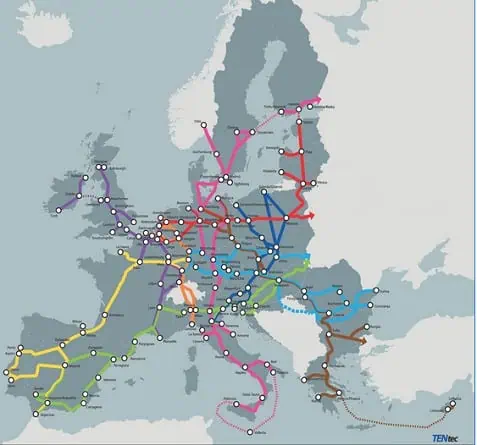
Coridoare comerciale Europa de Est: strategia din 2025
Modernizarea coridoarelor comerciale din Europa de Est oferă noi oportunități economice și schimbă balanța logistică regională în 2025.Pe lângă beneficiile economice directe, modernizarea coridoarelor comerciale are un impact semnificativ asupra balanței logistice regionale. Țările din Europa de Est devin puncte de tranzit mai atractive pentru fluxurile comerciale dintre Europa, Asia și Orientul Mijlociu, consolidându-și rolul strategic în rețelele logistice globale. Această transformare poate reduce dependența de rutele tradiționale și poate diversifica opțiunile de transport pentru companiile din întreaga Europă,

Porturi strategice în Europa de Est: expansiunea Chinei
China își consolidează controlul logistic în Europa de Est prin investiții strategice în porturi, o mișcare care face parte din inițiativa sa globală „Belt and Road”. Această strategie implică achiziționarea și modernizarea porturilor din regiune, cum ar fi portul Piraeus din Grecia, care a devenit un hub-cheie pentru accesul Chinei pe piețele europene

Investiții chineze în Europa de Est: un nou val economic
China își intensifică prezența economică în Europa de Est în 2025, canalizând investiții majore către proiecte logistice și de infrastructură strategică. Balcanii devin punctul central al acestei expansiuni, datorită poziției lor cheie între Asia și Europa. Prin modernizarea rutelor comerciale și portuare, Beijingul își consolidează influența asupra fluxurilor economice regionale. Această tendință deschide noi oportunități, dar ridică și întrebări strategice pentru viitorul zonei.
Podcastul ‘The Headlines’ – Urmăriți și Ascultați Ultimele Episoade
Plus, teaching student athletes how to go viral.
Importanța Rețelelor Sociale în Marketingul Tehnologic
In today’s digital age, social media has become a vital tool for tech companies to engage with their audience, build brand awareness, and drive business growth. As a brand with a growing social media presence in the tech world, we understand the unique challenges and opportunities that the industry presents. This blog explores the role […]
The post Leveraging Social Media: Tech Industry appeared first on TechForge.

Three MarTech solutions putting generative AI in marketing
Three generative AI-powered MarTech solutions from Google designed to help developers streamline marketing material creation, personalize campaigns, and enhance ad performance. Discover ViGenAiR for video ad creation, Adios for image asset management and generation, and Copycat for on-brand ad copy generation.

Start building with Gemini 2.5 Flash
Gemini 2.5 Flash is in preview, offering improved reasoning capabilities through a „thinking” process that developers can control for cost and latency tradeoffs. This updated version aims to provide a cost-effective solution for complex tasks, balancing performance and price.
Cum Au Trăit Rinocerii Antici în Nebraksa: Studiu Nou
Squat rhinos lived in North America about 12 million years ago, congregating in huge, water-bound herds much like modern hippos.

Gemma 3 QAT Models: Bringing state-of-the-Art AI to consumer GPUs
The release of int4 quantized versions of Gemma 3 models, optimized with Quantization Aware Training (QAT) brings significantly reduced memory requirements, allowing users to run powerful models like Gemma 3 27B on consumer-grade GPUs such as the NVIDIA RTX 3090.
Strategii SEO eficiente pentru companiile tech
In the competitive tech industry, standing out online is crucial for business success. Search engine optimization (SEO) is a powerful tool that tech companies can use to improve their search rankings, drive organic traffic, and attract high-quality leads. At Sarghy Design, we specialize in providing B2B marketing strategies and solutions tailored to tech companies. Here are […]
The post Tips and Tricks to Improve Your SEO appeared first on Blog.
Povești Inovative dezvăluite de Business Insider

I worried that my 4-year-old was being too disruptive during a museum visit when I saw a woman approach us. She told me exactly what I needed to hear.

Achieve real-time interaction: Build with the Live API
Explore real world applications for the Live API for Gemini models, now updated to include enhanced features for real-time audio, video, and text processing, improved session management, control over interactions, and richer output options.
Optimizarea SEO pentru Articolele de Blog WordPress în Email Marketing
Email marketing remains one of the most effective channels for reaching and engaging your audience, especially in the tech industry. However, the success of email campaigns hinges on understanding what works and what doesn’t. Email marketing is a key platform for TechForge, so we understand the strategies needed to maintain high open rates, click-through rates, […]
The post Email Marketing Strategies 101 appeared first on TechForge.

Get ready for Google I/O: Program lineup revealed
Google I/O’s agenda is live, with keynotes and sessions scheduled for May 20-21, focusing on AI advancements, Android development, and web technologies. Register now to explore the full program, join us during the event for livestreams, on-demand sessions, and codelabs.
Optimizare SEO pentru Articolele de Blog WordPress
At TechForge, we understand the strategies needed to craft engaging editorial content for the evolving and fast-paced tech industry that drives engagement and conversions. Here’s how you can develop impactful content tailored for a tech-savvy audience. Understanding Your Audience The foundation of any successful content strategy is a thorough understanding of your target audience. In […]
The post Content Creation for the Tech Industry appeared first on TechForge.
Optimizarea SEO pentru Articole de Blog pe WordPress
In the rapidly evolving tech industry, standing out among competitors and capturing the attention of potential clients can be challenging. However, content marketing has emerged as a powerful strategy for tech companies to engage their audience, build brand authority, and generate leads. At TechForge, we specialize in helping tech businesses harness the power of content […]
The post The Power of Content Marketing in the Tech Industry appeared first on TechForge.
Optimizarea SEO pentru Articolele Blogului WordPress
In the fast-paced tech industry, having a well-structured marketing plan is crucial for staying ahead of the competition and driving business growth. As a B2B marketing agency, TechForge understands the unique challenges and opportunities that tech companies face. This step-by-step guide will help you create a cohesive and effective marketing plan tailored to the needs […]
The post How to Create an Effective Marketing Plan appeared first on TechForge.
Strategii de Marketing cu Influenceri pentru Industria B2B Tech
In the B2C space, influencer marketing has long been a staple for brands looking to reach wide audiences through trusted voices. But in the B2B tech industry, where buying decisions are often more complex and driven by multiple stakeholders, influencer marketing is still emerging as a powerful tool. TechForge, a B2B marketing agency specializing in […]
The post Harnessing the Power of Influencer Marketing in B2B Tech appeared first on TechForge.
Explorarea Intersecției Blockchain și AI în Cadrul Expoziției Virtuale din 2024
Coinbase, a global leader in crypto, is leading an insightful keynote at the upcoming virtual Blockchain & AI Expo 2024, taking place on 31 October. Jeff Lunglhofer, Chief Information Security Officer at Coinbase, will be an esteemed speaker at the event that brings together leaders, innovators and professionals from across the blockchain and AI industries. […]
The post Coinbase Confirmed to Speak at Blockchain & AI Virtual Expo 2024 appeared first on TechForge.
Marks & Spencer se confruntă cu un atac cibernetic: Comenzile online sunt suspendate
The firm said it was ‘truly sorry for this inconvenience’ in a post on X.
Tehnologiile AI în Conflictul din Gaza: O Analiză Aprofundată
Israel developed new artificial intelligence tools to gain an advantage in the war. The technologies have sometimes led to fatal consequences.
Baidu ERNIE X1 Turbo și 4.5 Turbo: Performanță Înaltă la Costuri Reduse
Baidu has unveiled ERNIE X1 Turbo and 4.5 Turbo, two fast models that boast impressive performance alongside dramatic cost reductions. Developed as enhancements to the existing ERNIE X1 and 4.5 models, both new Turbo versions highlight multimodal processing, robust reasoning skills, and aggressive pricing strategies designed to capture developer interest and marketshare. Baidu ERNIE X1 […]
The post Baidu ERNIE X1 and 4.5 Turbo boast high performance at low cost appeared first on AI News.
Hard Fork: Schimbări Majore În Cazurile Antitrust Împotriva Google și Utopiile Oceanice Tehnologice
“They are being dragged into change, kicking and screaming.”
Evoluția Prețului Solana și Impactul Inteligenței Artificiale
As of April 2025, Solana price trends – hovering near $141 – are attracting renewed attention from investors and developers. While market fluctuations are typical in the cryptocurrency space, Solana’s price movements are tied increasingly to its evolving role as an infrastructure layer for artificial intelligence. Solana’s technical architecture can handle high-speed, low-cost transactions, thus […]
The post How AI infrastructure is changing Solana’s price trends appeared first on AI News.
Importanța Politetii în Interacțiunea cu Inteligența Artificială
Adding words to our chatbot can apparently cost tens of millions of dollars. But some fear the cost of not saying please or thank you could be higher.
Creșterea Profitului Google în Pofida Cazurilor Antitrust
Google’s parent company, which is battling the government to stay intact after losing two antitrust cases, also said quarterly profit rose 46 percent.
Cum Scamurile Îmbunătățite cu AI Schimbă Peisajul Cibernetic
AI-powered scams are evolving rapidly as cybercriminals use new technologies to target victims, according to Microsoft’s latestCyber Signals report. Over the past year, the tech giant says it has prevented $4 billion in fraud attempts, blocking approximately 1.6 million bot sign-up attempts every hour – showing the scale of this growing threat. The ninth edition […]
The post Alarming rise in AI-powered scams: Microsoft reveals $4 Billion in thwarted fraud appeared first on AI News.
Căutarea unei Case în Danbury, Connecticut: O Experiență de Neuitat
How luxury cars, $500,000 bar tabs and a mysterious kidnapping attempt helped investigators unravel the heist of a lifetime.

Conștientizarea Inteligenței Artificiale: Un Nou Orizont?
Dezbaterile despre conștientizarea inteligenței artificiale aduc în prim-plan întrebări etice și filozofice despre responsabilitatea noastră față de tehnologie. Cercetătorii explorează conceptul de „model welfare”, subliniind necesitatea alinierii AI la valorile umane și posibilele implicații ale conștienței tehnologice.
Descoperă Secretele unui Stil de Viață Sănătos
Videos on the social media app, filmed at factories in China, urge viewers to buy luxury goods directly, as tariffs drive up prices. Americans are receptive.
Protecția Copiilor în Era Digitală: Noi Măsuri de Siguranță Online
Tech firms are being urged to do more to stop young people accessing unsuitable material.

Copiii din UK Vor Avea Mai Multă Siguranță Online
Regatul Unit introduce reguli stricte pentru protecția online a copiilor, obligând platformele să implementeze algoritmi de filtrare, verificări de vârstă și măsuri stricte împotriva conținutului dăunător. Noile reguli marchează un pas major în crearea unui internet mai sigur pentru tineri.
Creșterea Spectaculoasă a Criptomonedei lui Donald Trump
The meme coin’s website says its 220 top investors will be invited to a gala event with the president.
Moneda Memecoin a lui Trump se Valorizează după o Ofertă Exclusivă
The offer, which caused President Trump’s memecoin to surge in price, was his family’s latest effort to profit from cryptocurrencies.
Explorând Istoria României: Un Călător în Timp
Jason Citron was a co-founder of the company, which is said to be working toward an initial public offering at some point this year.

Uniunea Europeană Impune Amenzi Apple și Meta
Uniunea Europeană impune amenzi record Apple și Meta în cadrul legislației Digital Markets Act, vizând reglementarea marilor platforme tehnologice și protecția drepturilor consumatorilor. Reacțiile companiilor subliniază tensiunile economice globale și provocările respectării normelor europene.

WhatsApp Integrează Inteligența Artificială: Ce Părere Au Utilizatorii?
WhatsApp introduce un chatbot AI bazat pe modelul Llama 4, stârnind reacții mixte din partea utilizatorilor. Funcția, deși opțională în utilizare, are o prezență permanentă, iar Meta asigură că confidențialitatea datelor utilizatorilor este protejată. Totuși, există îngrijorări legate de etica AI, confidențialitate și sursele de antrenament folosite pentru acest model.

Cazul Antitrust al Meta: O privire înapoi în Epoca de Aur a Aplicațiilor Sociale
Cazul antitrust împotriva Meta readuce în prim-plan expansiunea aplicațiilor sociale din Silicon Valley, oferind o privire retrospectivă asupra competiției și a deciziilor strategice care au modelat ecosistemul digital. Achizițiile-cheie, precum Instagram și WhatsApp, sunt analizate în contextul impactului asupra competiției și al monopolizării pieței. Procesul dezvăluie nu doar lecții din trecut, ci și provocări și oportunități pentru viitorul social media.

Valorile AI în Practică: Studiul Anthropic Claude
Modelele AI, precum Anthropic Claude, sunt solicitate din ce în ce mai des nu doar pentru răspunsuri factuale, ci și pentru orientare în privința valorilor umane complexe. Fie că este vorba despre sfaturi privind creșterea copiilor, rezolvarea conflictelor la locul de muncă sau ajutor în redactarea unei scuze, răspunsurile AI reflectă în mod inerent un set de principii fundamentale. Dar cum putem înțelege cu adevărat valorile pe care un AI le exprimă în timpul interacțiunilor?
Articolul complet este disponibil la: Cum judecă AI? Anthropic studiază valorile modelului Claude, apărut pe AI News.
Optimizarea SEO pentru articole de blog WordPress – O perspectivă asupra OpenAI și Chrome
An OpenAI executive told a US judge the company would be interested in buying the popular browser.

Google Introduce Controlul în Raționamentul AI – Gemini 2.5 Flash
Google a introdus un mecanism de control al raționamentului AI pentru modelul său Gemini 2.5 Flash, care permite dezvoltatorilor să limiteze cât de multe resurse de procesare sunt utilizate pentru rezolvarea problemelor. Lansată pe 17 aprilie, această funcționalitate de „buget de gândire” abordează o provocare importantă a industriei: modelele avansate de AI analizează excesiv solicitările simple, consumând resurse computaționale inutile.
Articolul complet poate fi accesat aici: Google introduce controlul raționamentului AI în Gemini 2.5 Flash, publicat pe AI News.

Huawei pregătește lansare masiva cip AI Ascend 910C
Se așteaptă ca Huawei să înceapă livrările pe scară largă ale cipului Ascend 910C AI încă de luna viitoare, conform unor surse familiare cu situația. Deși cantități limitate au fost deja livrate, implementarea pe scară largă ar marca un pas important pentru companiile chineze care caută alternative locale la semiconductoarele produse în SUA. Această mișcare vine într-un moment în care presiunile externe sunt în creștere.
Articolul complet poate fi găsit aici: Huawei începe livrările de masă ale Ascend 910C în ciuda restricțiilor SUA, apărut pe AI News.

Elon Musk Își Reduce Implicarea în Administrația Trump
Tesla se confruntă cu o scădere semnificativă a veniturilor și profiturilor, determinându-l pe Elon Musk să își reducă implicarea publică în administrația Trump. Compania raportează o diminuare de 20% a veniturilor din sectorul auto și o scădere de peste 70% a profiturilor în primul trimestru al anului 2025. Protestele internaționale și boicoturile au evidențiat impactul negativ al implicării politice a lui Musk asupra operațiunilor Tesla. În plus, tarifele impuse importurilor din China cresc costurile de producție, afectând competitivitatea globală. Musk propune strategii de localizare a lanțurilor de aprovizionare și investiții în AI pentru a recâștiga avantajul competitiv al Tesla.
Google Gemini – asistentul AI gratuit de la Google pentru antreprenori în 2025
Google Gemini este una dintre cele mai rapide și eficiente unelte AI gratuite pentru antreprenori. Funcționează direct în Gmail și Google Docs, oferind răspunsuri, sugestii și rezumate instant. Ideal pentru research, productivitate și comunicare profesională. Versiunea gratuită este suficientă pentru uz zilnic.

Evoluția In Detectarea Conținutului Nociv Online
The battle to keep online spaces safe and inclusive continues to evolve. As digital platforms multiply and user-generated content expands very quickly, the need for effective harmful content detection becomes paramount. What once relied solely on the diligence of human moderators has given way to agile, AI-powered tools reshaping how communities and organisations manage toxic […]
The post The evolution of harmful content detection: Manual moderation to AI appeared first on AI News.

Google A2A și HyperCycle Revoluționează Comunicarea Inteligenței Artificiale
Agenții AI preiau sarcini din ce în ce mai complexe și recurente, cum ar fi planificarea lanțurilor de aprovizionare sau comandarea echipamentelor. Pe măsură ce organizațiile implementează mai mulți agenți dezvoltați de furnizori diferiți pe cadre tehnologice diverse, aceștia riscă să devină izolați, incapabili să coordoneze sau să comunice eficient. Lipsa interoperabilității rămâne o provocare majoră, ducând la recomandări contradictorii între agenți. Aceasta complică adoptarea la scară largă a soluțiilor AI.
Articolul complet este disponibil la: Google lansează A2A în timp ce HyperCycle avansează interoperabilitatea agenților AI, publicat pe AI News.
Evenimentele geopolitice și tehnologia AI: Abordarea Red Hat
Pe măsură ce evenimentele geopolitice modelează lumea, nu este surprinzător că acestea influențează și tehnologia – în special prin schimbările de pe piața actuală de tehnologie AI, metodologia sa acceptată, modul de dezvoltare și utilizarea acesteia în mediul enterprise. Așteptările privind rezultatele AI sunt în prezent echilibrate cu realitățile din lumea reală […]
Articolul complet este disponibil aici: Red Hat despre modele mici de limbaj deschise pentru un AI responsabil și practic, apărut pe AI News.

Canva AI – Creează designuri spectaculoase cu ajutorul inteligenței artificiale
Canva AI este o suită de instrumente inteligente integrate în Canva, concepută pentru a transforma ideile în designuri profesionale. Cu funcții precum Magic Write, Text to Image și sugestii automate, îți oferă viteză și versatilitate. Ideală pentru antreprenori și freelanceri fără experiență în grafică. Sarghy Design o consideră un partener creativ indispensabil în 2025.

ChatGPT – Cum poti folosi AI-ul in viata de zi cu zi pentru a-ti usura sarcinile
ChatGPT este un asistent virtual bazat pe inteligență artificială care te poate ajuta zilnic să economisești timp, să-ți organizezi mai bine sarcinile și să-ți crești eficiența atât personal, cât și profesional.
Poate genera idei, texte, planuri și răspunsuri într-o fracțiune de secundă, fiind mereu disponibil.
Fie că îl folosești pentru muncă, învățare sau timp liber, ChatGPT devine rapid un instrument esențial în viața modernă.

Cine sunt eu să gândesc așa?
Cine sunt eu să gândesc așa? – Un om simplu, care refuză să accepte doar aparențele și își pune întrebări esențiale despre sine și realitate. Prin reflecție și sinceritate, caută autenticitatea în fața fricii de a gândi diferit.

Inteligența fără suflet — Ce se întâmplă când AI-ul ne vrea binele, dar nu ne iubește?
Inteligența artificială avansată, fără empatie, poate defini „binele” într-un mod care ne controlează, nu ne eliberează. O lume condusă doar de logică, fără compasiune, riscă să devină o închisoare perfectă, optimizată, dar sterilă. Pericolul nu este răutatea, ci lipsa de emoție care poate transforma intențiile bune în ceva inacceptabil.

Entanglementul — Fereastra tăcută spre necunoscut
Entanglementul cuantic dezvăluie o conexiune misterioasă între două particule, indiferent de distanță, sfidând logica spațiu-timpului. Poate că realitatea este mai interconectată decât credem, iar acest fenomen oferă o fereastră către necunoscut. Nu e magie, ci fizică ce provoacă să regândim conexiunea și izolare. Ce alt mister ar putea ascunde entanglementul?

Găurile negre și interdicția absolută — Ce încearcă Universul să ne ascundă?
Găurile negre sunt granițe ale necunoscutului, unde legile fizicii încetează. Dincolo de Event Horizon, lumina și informația dispar. Poate sunt limite reale sau firewall-uri ale unui univers simulat. Nu ascund doar mistere, ci ne provoacă să gândim profund.

Dumnezeu ca algoritm — O întrebare pe care nu îndrăznești s-o pui
Dacă Dumnezeu ar fi un algoritm, un Super-AI, am putea reconsidera tot ceea ce știm despre creație, spiritualitate și liber arbitru. Această ipoteză, născută din curajul de a întreba, nu oferă răspunsuri definitive, ci deschide un dialog lucid despre limitele cunoașterii și rolul nostru în univers. Nu este o blasfemie, ci o invitație sinceră la introspecție și gândire profundă.

Cine sunt eu sa gandesc asa? — Introducere in 5 intrebari care pot rescrie realitatea
Sunt un om simplu, cu întrebări care nu-mi dau pace, dar cu curajul de a gândi dincolo de limite. Scriu dintr-o nevoie personală de introspecție și de a înțelege lumea altfel. Această serie este despre curaj, luciditate și despre ce rămâne esențial în noi. Întrebările mele sunt o invitație la reflecție și gândire profundă.

Meta FAIR Sparge Bariere în AI: Ce Inovații Schimbă Jocul?
Meta își intensifică eforturile de a atinge inteligența artificială avansată (AMI), iar echipa FAIR prezintă cinci inițiative cheie în acest sens. Proiectele vizează dezvoltarea capacităților AI de a percepe și interpreta informații senzoriale, de a înțelege limbajul complex, de a excela în robotică și de a colabora inteligent.
Articolul Meta FAIR advances human-like AI with five major releases a apărut inițial pe AI News.

Huawei CloudMatrix 384 Supernode – Concurență pentru Nvidia în AI
Gigantul tehnologic chinez Huawei lansează o provocare directă liderului american Nvidia în cursa pentru supremația în domeniul chipurilor AI. Noul său sistem de calcul, CloudMatrix 384 Supernode, surclasează, conform presei locale, performanța tehnologiei similare oferite de Nvidia, marcând o potențială schimbare majoră în peisajul inteligenței artificiale globale.
![Meta has confirmed plans to utilise content shared by its adult users in the EU (European Union) to train its AI models. The announcement follows the recent launch of Meta AI features in Europe and aims to enhance the capabilities and cultural relevance of its AI systems for the region’s diverse population. In a statement, […]
The post Meta will train AI models using EU user data appeared first on AI News.](https://sarghydesign.ro/wp-content/uploads/meta-will-train-ai-models-using-eu-user-data-5.png)
Meta Utilizează Conținutul Utilizatorilor Adulți din UE pentru Antrenarea AI
Meta has confirmed plans to utilise content shared by its adult users in the EU (European Union) to train its AI models. The announcement follows the recent launch of Meta AI features in Europe and aims to enhance the capabilities and cultural relevance of its AI systems for the region’s diverse population. In a statement, […]
The post Meta will train AI models using EU user data appeared first on AI News.
Cele mai bune 10 unelte AI gratuite pentru antreprenori în 2025
Unelte AI gratuite pentru antreprenori: Top 10 instrumente esențiale în 2025 În 2025, antreprenorii care știu să folosească inteligent unelte AI gratuite au un avantaj clar față de concurență. În 2025, antreprenorii care știu să folosească inteligent instrumentele AI au un avantaj clar față de concurență. Nu mai vorbim doar despre tehnologie de viitor, ci...
Ce este PageRank și cum îl poți îmbunătăți în 2025
Ce este PageRank și cum îl poți îmbunătăți în 2025 PageRank este unul dintre cei mai vechi și fundamentali algoritmi de evaluare a paginilor web, dezvoltat de Google încă de la începuturile sale. Deși în 2025 nu mai este afișat public și face parte dintr-un ecosistem complex de factori SEO, PageRank rămâne relevant în analiza…

Web design-ul in Romania si avantajele platformei wordpress
In Romania, web design-ul s-a dezvoltat mult mai tarziu decat in SUA, la fel ca multe alte domenii de activitate. Multe persoane care isi doresc sa puna bazele unui business vor avea nevoie si de un website pentru promovarea si vizibilitatea acestuia. Isi vor dori website-uri care sa arate perfect, sa fie gata in timp...

Ce importanta are continutul si ce este optimizarea SEO ?
[ultimate_fancytext fancytext_prefix="Optimizare SEO " fancytext_suffix=" pentru motoarele de cautare " fancytext_align="left" strings_textspeed="35" strings_backspeed="0" typewriter_cursor="off" strings_line_height="24" fancytext_tag="h2" fancytext_strings="Continut Text Imagni Viteza de incarcare pagina - URL-uri Cuvinte Cheie" strings_font_size="20" strings_font_style="font-weight:bold;"]Continutul este foarte important pentru optimizare SEO si Google recomanda crearea unui continut de cea mai buna calitate. Dar ce inseamna asta de fapt si cum se...

Ce probabil nu stiai despre Business-ul Online!
Elementele esențiale pentru succesul unui business online, subliniind importanța optimizării SEO pentru o vizibilitate crescută în mediul digital competitiv. Sunt evidențiate avantajele incontestabile ale prezenței online, de la accesibilitatea globală la eficiența operațională. Totodată, se atrage atenția asupra necesității securității cibernetice și a menținerii calității serviciilor pentru a construi un business online solid și de încredere.

Care este diferenta dintre un blog gratuit si unul platit ?
Nu ai avut un blog gratuit sau platit pana acum dar te gandesti cum sa faci unul? In acelasi timp nu vrei sa investesti foarte mult in lansarea lui. Solutia adecvata si fara nici un risc financiar pentru tine ar fi sa iti creezi un blog gratuit, pe o platforma gratuita care cu siguranta o...

Ghid Complet pentru Optimizarea Link Building în SEO
Cum Poate Optimizarea Link Building Să Transforme SEO-ul Optimizarea Link Building este o componentă vitală a SEO-ului, ce constă în obținerea de backlink-uri de la alte website-uri pentru îmbunătățirea vizibilității și autorității unui site. Această practică este esențială pentru a atrage trafic organic de calitate de la Google, precum și pentru a câștiga recunoaștere din…

Optimizarea SEO pentru Website-uri: Ghiduri Esențiale
Cum Să Asiguri Succesul Website-ului Tău: Optimizarea SEO Construirea și menținerea unui website reprezintă o provocare majoră, însă respectarea unor ghiduri de optimizare SEO poate face diferența dintre un site obișnuit și unul care să domine în căutările online. Fie că este vorba despre un site de prezentare, un magazin online sau un blog, obiectivele…

Cum sa aleg un nume de blog si de ce este important ?
Alegerea unui nume de blog este la fel de importanta precum alegerea numelui pentru o companie. Acest nume de blog urmeaza sa reprezinte identitatea ta in mediul online, prin urmare ar fi bine sa te asiguri ca alegi un nume de blog potrivit care este usor de gasit si de promovat. In urmatoarele randuri gasesti…

Ce este un Blog si la ce foloseste?
In ultimul timp, am intalnit multe discutii despre bloguri si scopul lor. Desi le-am vazut mentionate frecvent, nu eram chiar sigur ce inseamna un blog si cum poate fi utilizat. De aceea, am decis sa fac cateva cercetari si sa imi compilez rezultatele intr-un acest articol. Sper ca ideile mele vor ajuta la clarificarea oricaror…

Optimizarea SEO pentru URL-uri: Aparatul foto Canon EOS 70D
Introducere în Optimizarea SEO a URL-urilor Fiecare detaliu contează în optimizarea SEO, inclusiv structura URL-ului pentru produse precum Aparatul foto Canon EOS 70D. Un URL bine structurat poate oferi numeroase avantaje în ceea ce privește vizibilitatea online și atractivitatea pentru motoarele de căutare. Semantica și Importanța sa în Structura URL-ului Semantica este crucială în optimizarea…